
The right side had felt thin for weeks. Measured, it was 7 dB down around 100 Hz. I swapped the two speakers and measured again, and the thin one was still the right-hand position. The problem was not the box. It was the distance to the wall behind it.
The short answer
A left-right difference in frequency response is almost always asymmetric placement, not unit variation. Between 50 and 200 Hz in particular, a few tens of centimetres of difference in the distance to the wall behind or beside the speaker is worth several dB. The procedure to settle it is fixed: keep the mic still, measure one side at a time, overlay the curves, then physically swap the two speakers and measure again. If the difference travels with the box, the speakers differ. If it stays on the same side of the room, the room does.
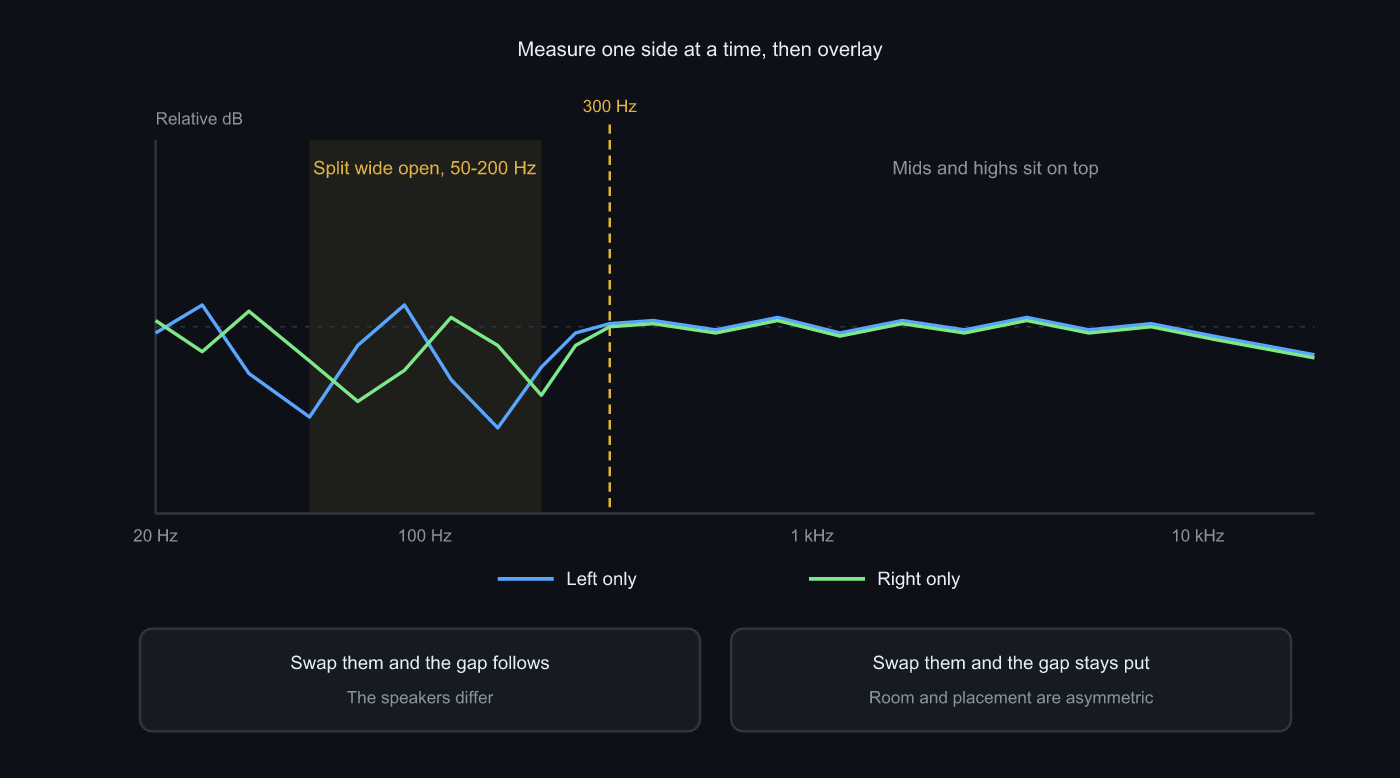 Splitting apart at 50-200 Hz and overlapping higher up is the typical picture. The swap test is what turns it into a cause
Why the two sides differ
What reaches the mic is direct sound plus everything the walls and floor send back a moment later. The reflected part arrives with its phase shifted, so at some frequencies it adds and at others it cancels. The first cancellation from a boundary at distance d lands near c/(4d). With the speed of sound at 343 m/s, a wall 50 cm behind puts it around 172 Hz, and 80 cm puts it around 107 Hz.
That is where the whole thing comes from. If one speaker sits 50 cm from the wall behind it and the other 80 cm, their notches land at 172 Hz and 107 Hz. Same speakers, same amplifier, same room, and yet several dB of difference in that region is the normal outcome. Most of what people describe as “only the left side has proper bass” is exactly this, and nothing inside the cabinet is involved. Room modes pile on top: if your seat is off the room’s centre line, the standing waves are not symmetric about it either.
Above 300 Hz the situation changes. Wavelengths get short, direct sound wins over the room’s average reflections, and the two curves normally overlap. A split up there means the first-reflection environment is lopsided, typically furniture or a wall on one side only. Higher still, above a few kHz, the speaker’s aim dominates. Directivity is narrow there, so a few degrees of toe-in difference moves the level.
Unit variation is the first thing everyone suspects and the last thing that turns out to be true. Speakers sold as a pair ship as a matched set, and unless one side’s surround has aged badly, the room’s asymmetry is larger by an order of magnitude. That is why the swap test comes first.
The procedure
- Put the mic on a tripod at the listening position, ear height. It does not move again
- Balance fully left, or unplug the right speaker, and sweep. Recording peak between -6 and -12 dBFS
- Balance fully right and measure with the same sweep length, without touching the volume knob or any app setting
- Overlay the two in Compare measurements and find the bands where they split
- Physically swap the two speakers, leave the mic alone, and redo 2 and 3
Step 5 is the point of the whole thing. Skip it and “the sides differ” never becomes “here is why”. Lifting boxes around is tedious, but it takes twenty minutes and it ends the argument. Swap the cables along with the speakers and you clear the cables of suspicion at the same time.
Compare measurements in Sonir overlays two curves and puts the A-B difference on top. Left and right were measured with the same mic, the same calibration and the same position, so no mismatch warning should appear. If one does, something changed the mic profile or the calibration state between passes.
What each band is telling you
| Band | How the difference shows | Usual cause | What to do |
|---|---|---|---|
| 20-50 Hz | A few dB is normal | Room modes plus an off-centre seat | Move the seat / room EQ |
| 50-200 Hz | Large, sometimes over 5 dB | Cancellation from walls and floor at unequal distances | Match the distance to the walls |
| 200 Hz - 2 kHz | Normally overlaps | If it splits, furniture or a reflecting surface on one side | Treat both first-reflection points |
| Above 2 kHz | Moves with aim | Toe-in difference, nearby reflecting surface | Match the angles |
When you find a difference at 50-200 Hz, go get a tape measure before you go anywhere near EQ. Measure from each speaker to the wall behind it and to the nearest side wall. If the numbers differ, the job is easy: matching them shrinks the difference without a single filter.
Matching the response does not match the imaging
Two curves lying on top of each other do not guarantee a centred image. Frequency response only describes how much energy arrived in each band. It says nothing about when it arrived. Half a millisecond of arrival-time difference pulls the image to one side, and the response graph stays silent about it.
That is what the Imaging mode in Sonir’s measurement tab is for. It plays a left sweep, a gap, then a right sweep as one stereo signal, records the whole thing with a single mic, and reports the arrival-time difference (LTE), cross-correlation, group-delay difference and phase difference as raw values. There is no combined score, deliberately: symmetry figures move with the measurement conditions, and rolling them into one number hides what you are actually looking at. Frequency response is the question of how much, Imaging is the question of when, and both have to line up before the sides really match.
Common mistakes
Measuring with both speakers playing. You get one curve of the summed sound, and the difference disappears into it. Check that the balance control is not centred, every single pass.
Moving the mic between passes. You bumped the tripod, or leaned across to reach a speaker. Bass moves several dB over a few tens of centimetres, which is enough to change the number you are about to interpret. Nobody touches the mic until both sides are done.
Skipping the swap and blaming the units. Then boosting one side with EQ. If the cause was an unequal distance to a wall, that correction becomes excessive the moment you move your chair 10 cm. Sonir’s room EQ limits corrections to 20-300 Hz and caps each boost at +6 dB precisely because of that uncertainty.
As an aside, the two single-side measurements have a use in air recording as well. When one channel of a recording sounds oddly boxy, holding it against the measured curves tells you which band your ears were reacting to.
The right side in my room ended up 2 dB down at 100 Hz instead of 7 dB, once the distance to the wall matched the left. Getting there meant pulling both speakers 20 cm further into the room, which cost me the space to push my chair back. Knowing the cause and being able to fix it in the room you actually have are, unfortunately, two different things.
FAQ
Does a left-right difference mean a speaker is faulty?
Almost never. A difference of tens of centimetres in the distance to the wall moves the 50-200 Hz region by several dB, so healthy gear measures asymmetrically in a real room. Only suspect a faulty or mismatched unit once you have swapped the two speakers and confirmed that the difference follows the box.
How many dB of left-right difference is acceptable?
In a room the bass difference never reaches zero. A few dB below 200 Hz is normal. The region worth worrying about is 200 Hz to 2 kHz: a large split there means the reflecting environment, furniture or walls, is asymmetric. Rather than chasing a number, care about whether the swap test settles the cause.
Why not measure with both speakers playing?
With both playing you get a single curve of the two sources summed in the air, and the left-right difference is buried inside it. Playing one side at a time to build two curves is the only way to see the difference at all.
One side is thin in the bass. Can I just fix it with EQ?
If the cause is cancellation from a wall at a different distance, EQ is an inefficient fix and turns excessive as soon as you shift position slightly. Matching the distance to the wall on both sides is far more reliable. Keep the order: fix the placement first, fill in what remains with EQ.
Only the treble differs between the sides. What should I look at?
Toe-in and a nearby reflecting surface on one side. Directivity is narrow up high, so a few degrees of angle difference changes the level above a few kHz. A wall or a display close to one speaker shows up in the same region. Match the angles and measure again to separate the two.
Related reading
- Measuring speaker frequency response with a smartphone: the parent guide, from sweep to curve
- Speaker or room? Separate them with two measurements: the distance version of the same split, and the companion to this one
- Where do you put the microphone for a room measurement?: keeping the mic in one place across passes
- How do you A/B two speakers fairly?: getting two curves onto the same footing
- Standing waves: why the bass misbehaves in a room: why the low end is not symmetric to begin with
Measure it with Sonir
Sonir turns a phone into an acoustic measurement and comparison tool. Run a sweep, get a frequency response from the impulse response, and overlay a left-only and a right-only pass with the difference shown on top. The same measurement tab carries an Imaging mode for arrival-time and phase differences, so you can line the two sides up in level and in timing. Everything, from the measurement to per-band analysis and overlaying measurements, is free.
Download on the App Store. Android is coming soon. See the features page for more.