
I dropped the chair 30 cm and re-measured, and a deep notch at 80 Hz disappeared. Nothing about the room had changed. The only thing that moved was the microphone.
The short answer
Put the measurement mic at the seat you actually listen from, at ear height. Mount it on a tripod, keep it away from walls, desks and your own body, and aim the capsule straight up when the room is what you are measuring. Distance: 2-3 m for room measurements, around 1 m when you want the character of the gear itself.
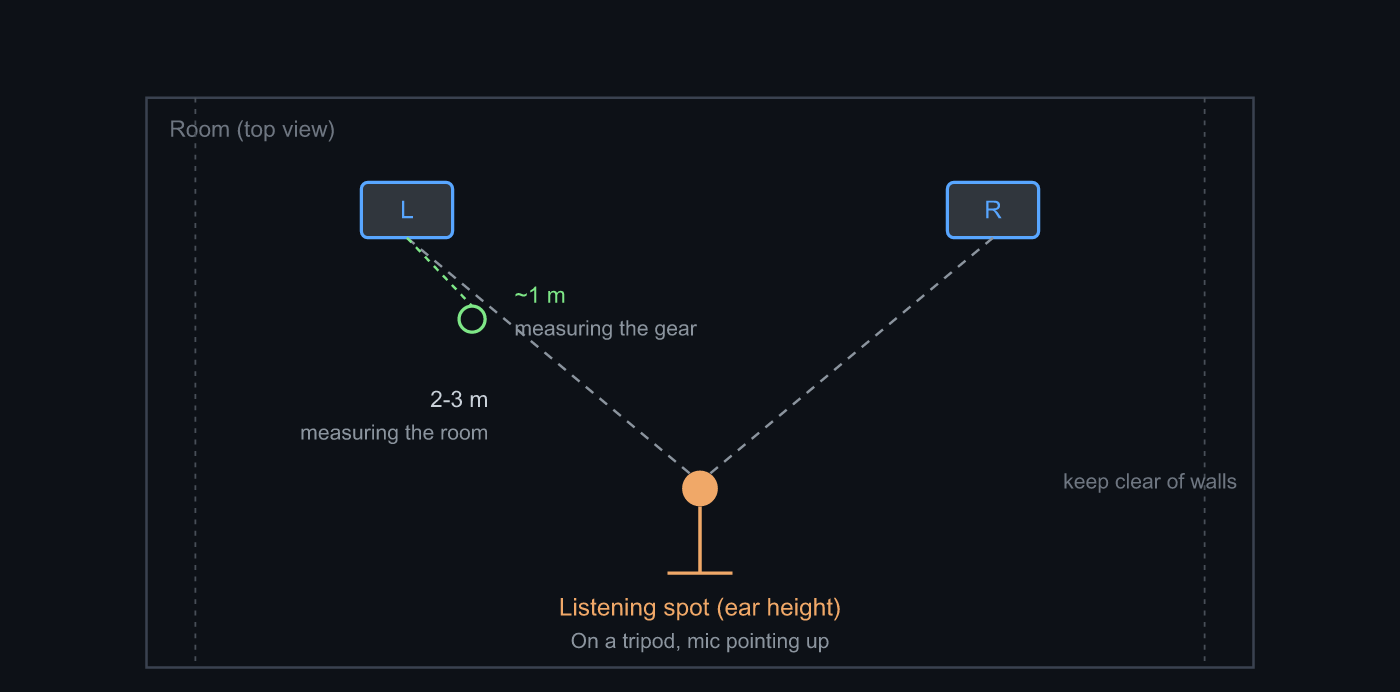 Anchor on the listening seat. Stay off nearby reflecting surfaces and fix the height with a tripod
Why placement changes the numbers this much
Below a few hundred hertz, standing waves set by the dimensions of the room are in charge. Same room, same speakers: at an antinode a given frequency lifts, at a node it can drop by more than 10 dB. That 80 Hz notch in the opening was not a fault of the room. The mic simply sat near a null.
The lower midrange has a different culprit. Reflections off the front wall and the floor arrive slightly late and cancel the direct sound at specific frequencies, and which frequencies depends on the distance between speaker and surface. So you don’t have to move a speaker to move the notch. Moving the mic does it.
Higher up it gets finer still. Wall reflections lay down a comb of peaks and dips so tightly spaced that a few centimetres of mic travel swaps them around. Making correction decisions from a single measurement up there isn’t just pointless, it’s harmful. That is why Sonir keeps room EQ focused on 20-300 Hz and caps boost at +6 dB per filter: the assumption baked in is that you cannot electrically flatten something that moves when you do.
The procedure
- Measure at the seat you actually listen from. Not the centre, not on-axis at 1 m.
- Fix the height with a tripod, matched to your ears while seated.
- Keep several tens of centimetres from walls; avoid desktops and monitors.
- Point the capsule straight up. Use the 90° calibration curve if you have one.
- Set the recording peak to -6 to -12 dBFS and run the sweep.
- Shift 30-50 cm and capture two more positions.
The distance depends on what you’re asking
“Measurement” isn’t one thing. What you want to know decides where the mic goes.
| What you want to know | Mic position | What gets captured |
|---|---|---|
| How the room rings (RT60, room EQ) | listening seat, 2-3 m | reflections and room modes included |
| What the gear itself sounds like (tonal character, response) | ~1 m from the speaker, away from walls | direct sound dominates, room contribution thin |
| Imaging and left/right symmetry | listening seat, several points translated on a tripod | arrival-time difference and how position-dependent the cancellations are |
Sonir’s tonal profile measurement walks you to roughly 1 m inside its wizard, deliberately separate from an ordinary sweep. Measure the same speaker at 2-3 m and the room’s colour mixes in, which breaks the one thing gear-to-gear comparison needs: identical conditions.
Imaging is stricter again. It assumes a tripod, because the method translates the mic centre, left, right, up and down and measures each point in turn. If the relative positions wobble, the quantity you think you’re measuring doesn’t exist. Handheld doesn’t degrade the result there so much as invalidate it.
Common ways to get it wrong
- Holding the phone: your body reflects, and the position is new every time.
- Laying the phone flat on a desk: the desktop reflection arrives in the worst possible way and rewrites the midrange.
- Right up against the chair back: a hard surface 30 cm behind the mic matters more than it looks like it should.
- Moving the mic between runs: you think you’re seeing a difference between speakers. You’re seeing a difference in position.
That last one cost me half a day. I was lifting the tripod out of the way each time I swapped speakers, and putting it back tens of centimetres off. The low-end peaks and dips changed every run, and I nearly concluded that one speaker had no bass. It was the mic. Once I taped marks on the floor, the same notch showed up in the same place. The gear-profile and room-tag fields came out of that afternoon.
FAQ
Should the mic go in the middle of the room?
No. The centre tends to sit on a null of the low-frequency room modes, so bass that is genuinely present shows up as a hole in the measurement. Measure at the seat you actually listen from, and only use the centre when you are specifically hunting room modes.
Should the mic point at the speakers or straight up?
Straight up when you are measuring the room from the listening seat. If your calibration file contains both a 0° (on-axis) and a 90° (vertical) correction curve, pick the 90° one. The 0° curve is for close, on-axis measurements of a single speaker.
What exactly is ear height?
There is no fixed number. Sit down and measure your own ears. A typical listening chair lands somewhere around 100-120 cm off the floor, but a sofa and an office chair can differ by more than 10 cm.
Is handheld measurement really that bad?
For a rough RT60 reading it is usable. For comparing frequency responses or measuring imaging it is not. Your body reflects sound back into the capsule, and the position drifts between runs, so you can no longer tell a gear difference from a placement difference.
How many positions should I measure?
Three at minimum: the listening seat plus 30-50 cm in each direction. That is enough to separate the room’s own character from artefacts of one spot. Avoid EQ-boosting a dip you have only seen in a single measurement.
Related reading
- Measuring room acoustics with a smartphone: the complete guide: the parent guide, and the whole measurement picture
- What recording level should a measurement hit?: placement first, level second
- Which band should room EQ fix first?: what to do about the bass that moves with position
- How do you A/B two speakers fairly?: why the same mic position is a precondition
Measure it with Sonir
Sonir does acoustic measurement and comparison on the phone. Once the mic is placed, a single sweep gives you RT60, frequency response and a waterfall automatically. Each measurement keeps its gear profile and room tag, so later you can check whether two runs really shared a position. Everything is free, including per-band analysis.
Download on the App Store. Android is coming soon. More on the features page.