
The question that comes up first, every time, is “which microphone should I buy?” It arrives in the wrong order. What you buy is downstream of what you are trying to compare.
The short answer
A smartphone on its own is enough to start. For recording takes on the same phone and reading the difference between them, the built-in mic covers it. Gear becomes necessary for three reasons: you want the mic in the same place every time, you have hit the band limits of the phone mic, or you need to state absolute numbers. The buying order follows that same list.
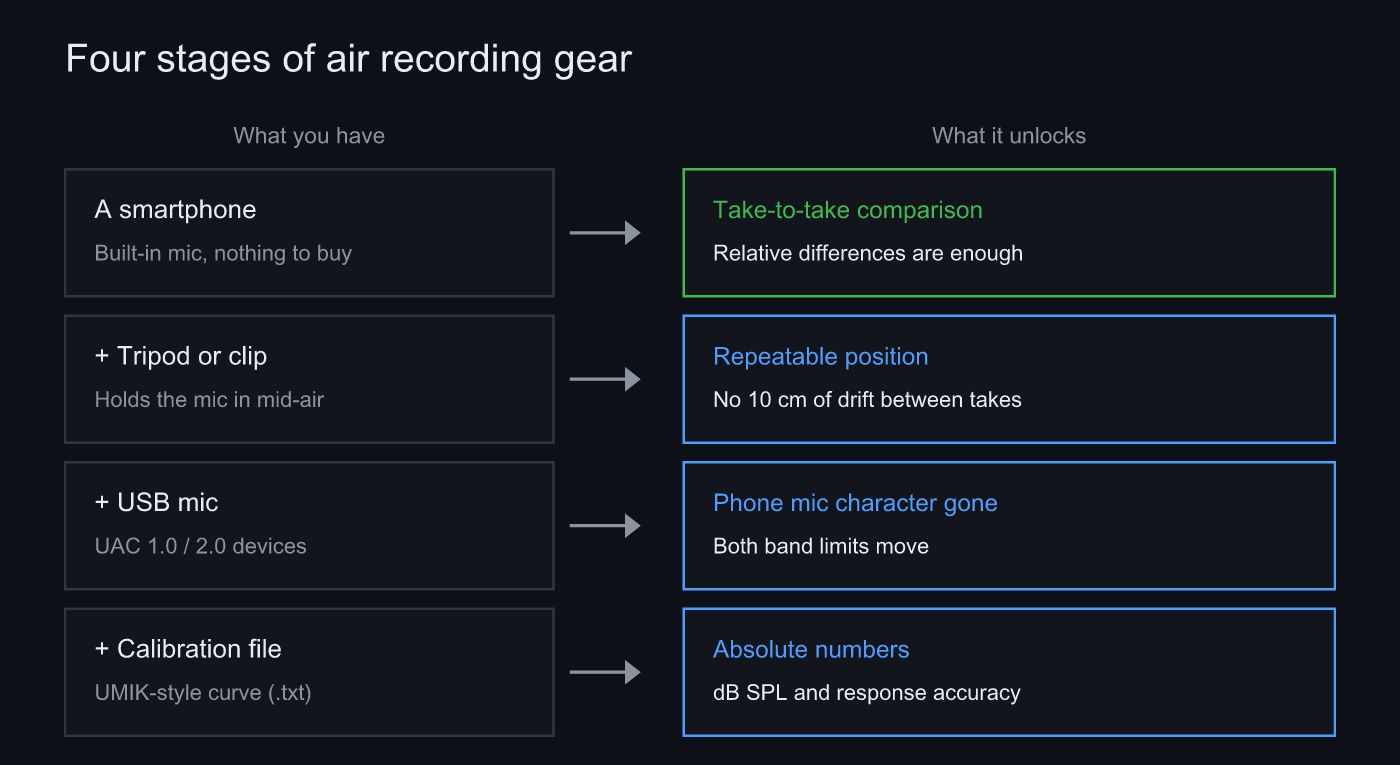 A phone gets you started, a tripod fixes the position, a USB mic extends the band, a calibration file gets you absolute numbers
Why the built-in mic is enough
What air recording is usually asked to show is a relative difference. You swapped the speakers, moved them 10 cm, put one absorber panel in. The question is how it changed compared to last time, not what the absolute value is.
And the built-in mic’s character rides on the earlier take and the later take by exactly the same amount. Put the two side by side and most of that character cancels out. That is the whole substance of “a phone is enough.”
The cancellation has a condition though: same phone, same position, same source, same level. Break that and the comparison collapses well before microphone quality gets a chance to matter. Rank the causes of take-to-take scatter by impact and the microphone does not come near the top. Source, level and position do.
Some things do not cancel. Bands the phone mic never picked up do not come back when you subtract, and that is the bottom of the low end and the top of the high end. There, gear is the only answer. The other one is automatic gain control, which lifts the quiet passages on its own, so unless it is off the whole notion of a recording level falls apart. Sonir locks the gain at the start of a take and holds it for the full length, and turns AGC off per device model.
The order to buy in
- Record one take on the built-in mic: write down the distance and position, and save it. Without a baseline take, a gear swap cannot be judged as better or worse.
- Buy the thing that holds the mic first: a tripod or a clip. Fix the phone in mid-air and the distance, height and angle all come back identically next time.
- Decide how the source gets played: this device’s speaker, or a network renderer fed the reference source. Recording your own system means the second one.
- Add a USB mic when you hit the band limits: when the low or high end stops moving. UAC 1.0 / 2.0 means plug in and select.
- Load a calibration file only for absolute numbers: dB SPL, or a response you intend to state at absolute accuracy. Relative work never needs it.
Step two sits ahead of a hundred-dollar microphone because the money-per-effect is not close. Handheld, the distance, the height and the angle move every take, and a better mic does not remove that scatter. A tripod is cheap, and it keeps paying every session after the first.
What actually changes with a USB mic
Mostly the edges of the band, and the noise floor. A measurement mic reaches lower and higher than a phone mic, so those limits stop being the thing you run into. Load the matching calibration file and a per-frequency correction curve comes with it, which is what lets you state absolute numbers at all.
Measurement mics have their own self-noise, though. A rise in the low end in a quiet room can turn out to be the microphone’s floor rather than the room. Going external is a real improvement; it is not a switch that makes everything correct at once.
FAQ
Can you do air recording with only the built-in mic?
Yes. For comparing takes on the same phone and reading the relative difference, the built-in mic is enough. The mic’s own character rides on the earlier take and the later take equally, so most of it cancels the moment you put the two side by side. You only need an external mic with a calibration file when you want to state absolute sound pressure or an absolute frequency response.
What is the first thing worth buying?
A tripod or a clip, not a microphone. Handheld, the distance, the height and the angle change every take, and that scatter survives any microphone upgrade. Only once the position is fixed does a gear change become readable.
Do USB mics connect straight to a phone?
A UAC 1.0 / 2.0 USB mic records on iPhone, iPad and Android alike. You will need the right adapter for the port, and a power-hungry interface may need a self-powered hub. Sonir does not lock to 48 kHz but follows the input device’s native rate, so a mic that outputs 96 or 192 kHz is captured at that rate.
Will a Bluetooth mic work for air recording?
Not recommended. Bluetooth audio input goes through the path built for phone calls, so the bandwidth falls short and the top end you came to look at is never recorded in the first place. Keep the capture side wired or USB even if the rest of the chain is wireless.
Is a calibration file mandatory?
Not if you only compare. Calibration matters for two things: putting an absolute dB SPL number on a level, and stating a frequency response at absolute accuracy. Sonir reads UMIK, REW and FRD format calibration files and stores them against a mic profile. A 90 degree file, mic pointing straight up, is the recommended one.
What do I need to play the source through my own speakers?
A DLNA/UPnP capable renderer. Sonir’s record tab switches the output between this device and a network device; pick the latter and the reference source is streamed to that device while the phone records. The imaging metrics are also only computed for network device recordings.
Related reading
- Record and Compare Your Gear Under the Same Conditions: the parent guide, from recording to comparing
- Why Does the Same Speaker Sound Different Every Take?: the four things that move, and how to pin each one down
- Can you measure frequency response without a calibration mic?: how far uncalibrated measurement can be trusted
- What dBFS should a measurement recording peak at?: where -6 to -12 dBFS comes from, and what clipping costs
Measure it with Sonir
Sonir is an app that keeps recording, acoustic measurement and comparison on your phone. Start on the built-in mic; when a USB mic arrives, plug it in and select it. Load a calibration file and it is stored against that microphone and applied automatically from then on. The recording score, tonal comparison, and overlaying measurements against each other are all free.
Download on the App Store. Android coming soon. See the features page.