
I looked at a frequency response measured with a built-in mic, saw “my room has an 8 kHz lift,” and EQ’d it out. The lift was the mic, not the room. An uncalibrated curve has to be read by splitting what you trust from what you doubt.
The short answer
Without a calibration mic you can still trust the big low-frequency peaks and dips (20–300 Hz) and the difference between two A/B takes recorded with the same mic in the same spot. What you cannot trust is absolute SPL (dB), the fine ripples in the treble, and auto EQ. A calibration file (.txt) is what fills in that “cannot trust” side. So it is neither “uncalibrated FR is worthless” nor “calibration makes everything exact.”
The shape survives because the curve is relative
Sonir’s FR is a relative curve, not an absolute level. It normalizes the midrange (300 Hz–3 kHz) to 0 dB and smooths at 1/6 octave. That is what saves you. Even if a mic’s sensitivity shifts the whole curve by a few dB, normalization re-anchors it, so the shape of the peaks and dips stays put.
Low-frequency room modes swing by an order of magnitude: +8 dB at 45 Hz, then −6 dB right next to it. A decent mic’s coloration, by contrast, is a few dB in the treble. One is far larger than the other, so the big low-frequency features read fine without calibration. “80 Hz is bulging” is legible even on a built-in mic.
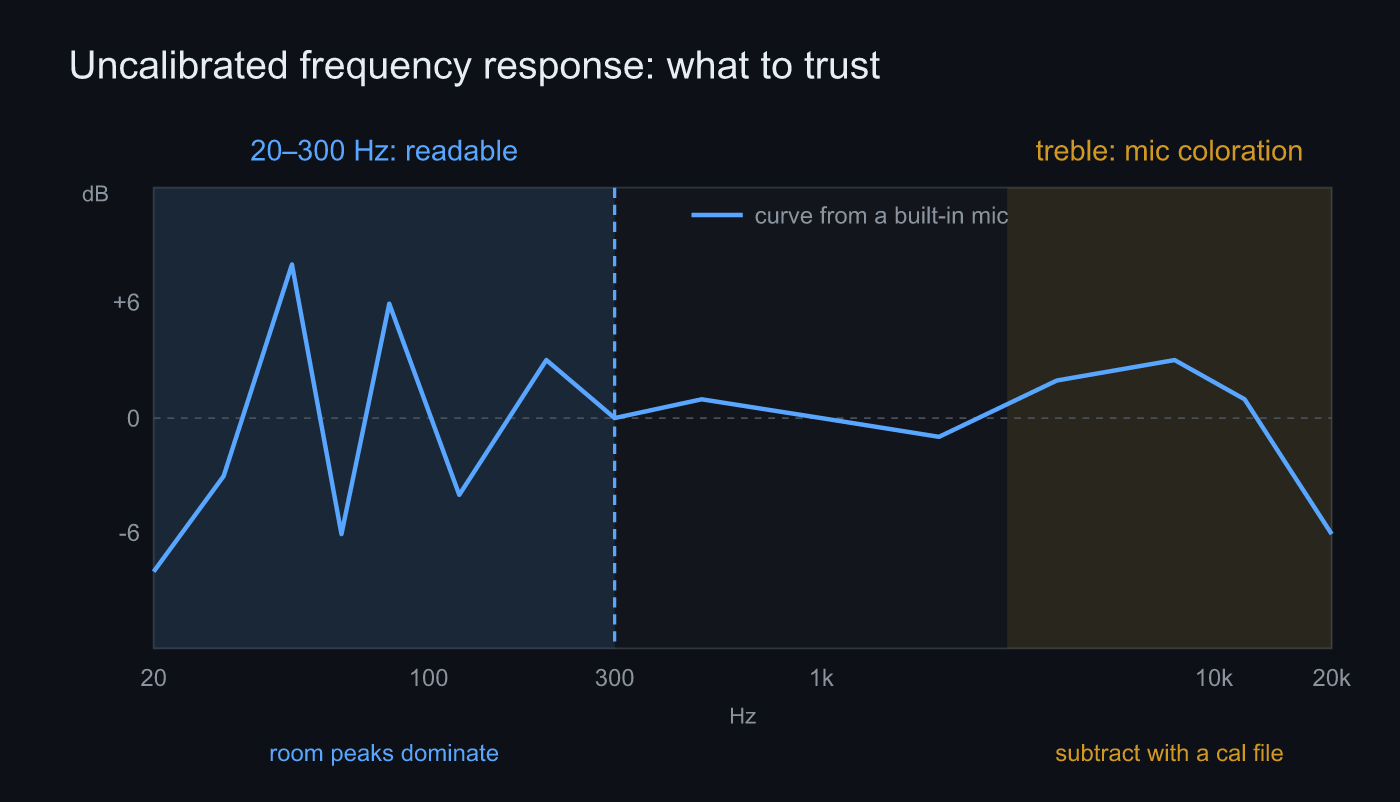 The big low-frequency peaks and dips read without calibration. Absolute level and the treble coloration are what a calibration file subtracts
What to doubt: absolute values and the treble
Line up the side you cannot trust.
Absolute SPL first. A built-in mic alone will not give you “so many dB SPL.” With no calibration offset, Sonir falls back to a relative dBFS display. If you want to talk noise levels or loudness, you need calibration.
Then the treble detail. Built-in mics have no published response: the low end rolls off, the top end lifts or dips on resonance. That coloration mixes into the room’s ripples. Chase the fine peaks above 300 Hz one at a time and you end up correcting the mic instead of the room. That opening 8 kHz was exactly this.
Same-condition A/B is strong even uncalibrated
This is where Sonir’s FR earns its keep. Keep the same mic in the same position and swap only the speaker between A and B. The mic’s coloration rides equally on both curves, so the moment you subtract them it cancels. What is left is the real difference between A and B.
So for comparison work, where you do not need absolute accuracy, an uncalibrated built-in mic is plenty. “Which one has more low end?” and “Did the EQ actually change anything?” get answered with no calibration file at all. Sonir leans on same-condition metadata (gear, position, room tags) precisely to make that cancellation hold.
The two things a calibration file fixes
Calibration is one equation.
calibrated = measured + offset + freq_correction(f)
The offset corrects a band-wide shift, the absolute level. freq_correction(f) subtracts the mic’s per-frequency coloration. Only with both does the treble detail and the absolute value become trustworthy. Sonir reads UMIK / REW / FRD text; it picks up numeric rows even when the columns are ordered differently. A UMIK owner just loads the bundled .txt once.
Steps
No calibration mic on hand? Here is how to use it within the range you can trust.
- Record with the same mic in the same spot: an A/B is valid on this alone. The mic’s coloration rides on both takes and cancels.
- Read the big low-frequency peaks and dips: focus on the 20–300 Hz modal region. The shape survives without calibration here.
- Do not read absolute SPL: read the position of the peaks and dips as a relative curve. Hold off on “so many dB” until you calibrate.
- Do not trust the treble one bump at a time: treat the fine ripples above 300 Hz as carrying the mic’s coloration.
- For real correction, load one calibration file: auto EQ only runs on a calibrated mic. Load a UMIK .txt to make the treble and absolute level trustworthy too.
FAQ
Can I run an A/B comparison on uncalibrated frequency response?
Yes. If you keep the same mic fixed in the same position, the mic’s coloration lands equally on both curves and cancels in the difference. Calibration matters for absolute values and the single-curve shape, not for a same-condition comparison.
Does absolute SPL (dB) work without calibration?
No. Without an offset, Sonir falls back to relative dBFS. If you want an absolute noise or loudness figure, set the offset with a calibration file or a reference source.
Can I correct a built-in mic’s frequency response?
Built-in mics have no published response curve, so there is usually no calibration file for them. To trust treble detail and absolute level, use a measurement mic that ships with a calibration file (such as a UMIK). Keep the built-in mic for relative reads and A/B.
Which calibration file formats are supported?
UMIK (miniDSP), REW, and FRD text formats. A generic numeric table that matches none of them is still read line by line.
Can auto EQ run without calibration?
No. Sonir generates auto EQ only for a mic with a registered calibration file. Uncalibrated, you can still see the frequency response and overlay a target curve.
Related
- Measure frequency response and apply room EQ from a phone: the parent guide, from measurement to correction to export
- Which band should room EQ fix first?: the low-frequency correction where calibration starts to matter
- The complete guide to measuring room acoustics with a smartphone: what a sweep to IR actually measures
Measure it with Sonir
Sonir is an app that does acoustic measurement and comparison entirely on your phone. The frequency response in this article measures the same way: a relative curve and same-condition A/B without a calibration mic, and treble detail plus absolute level once you load a calibration file. Everything is free, including the per-band deep dives.
Download on the App Store. Android coming soon. See the features page.