
I re-recorded a take I had made the week before, and the bass was visibly thinner. Neither the speaker nor the amp had been touched. What had moved was the chair, and the phone sitting on it.
The short answer
Four things account for almost all of the drift: the source, the recording level, distance and mic position, and the room and time of day, roughly in that order of impact. Put the other way round, only when all four are identical does the leftover difference actually describe your gear. Sonir fixes the source to a bundled reference, holds the level with a locked gain and AGC forced off, and recalls distance, gear and room from a preset.
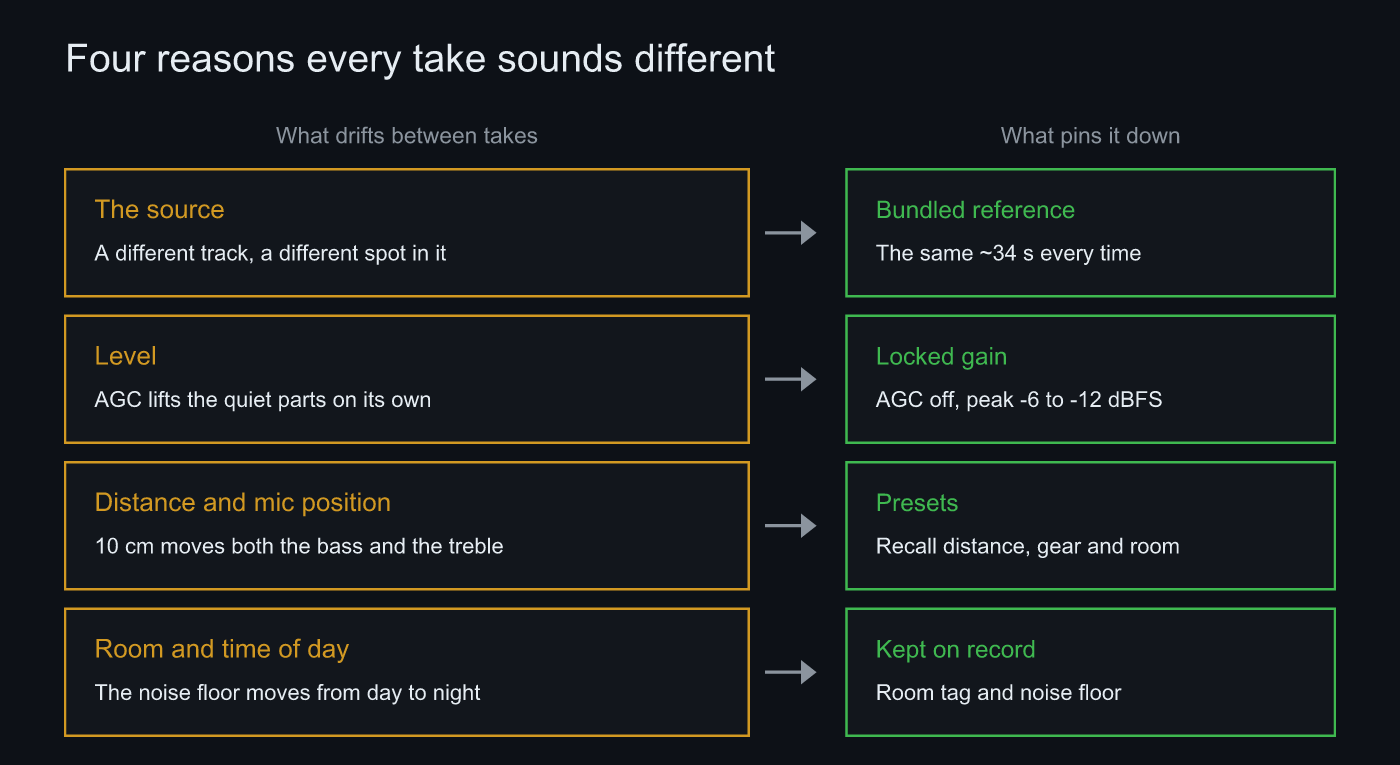 On the left, what moves between takes. On the right, what holds it still
Why it happens
The source is the largest factor and the most often ignored. Change the track and the energy distribution across the bands changes with it, so frequency balance and the apparent noise floor stop being comparable. Even within one track, starting somewhere else turns a quiet intro and a dense chorus into two different recordings. That is why Sonir’s record tab standardized on a fixed waveform bundled with the app, Sonir Reference (stereo / 16-bit / 44.1 kHz, about 34 s). Recording whatever track you feel like was removed: it pulls the floor out from under any comparison.
Level is next. Left to itself, a phone mic runs automatic gain control and lifts the quiet passages on its own. Once that is in the signal, the gain scatters between takes and neither noise floor nor dynamic range means anything. Sonir locks the gain at the start of a take, holds it for the full length, and kills AGC per device. Aim for a peak between -6 and -12 dBFS.
Distance and mic position hit the bass hardest. Room modes swap peaks and dips from one spot to the next, so moving 10 cm is worth several dB down low. The top end is more sensitive to angle: turn 15 degrees off axis and it drops.
Last is the room and the time of day. The noise floor between the small hours and midday can differ by more than 10 dB, which quietly changes the impression of the quiet passages and nothing else. Recording everything you want to compare in one sitting is usually the shortest path.
The steps
- Record the same reference source every time: do not change the track between comparisons. With a fixed bundled waveform, the source difference never enters.
- Pick an output path and leave it alone: this device’s speaker, or a network device. Decide before you start.
- Lock the input gain and turn AGC off: do not touch the gain mid-take. Peak between -6 and -12 dBFS.
- Recall distance, gear and room from a preset: save them under a name, apply them to the next take.
- Check the score and the frequency response afterwards: compare clipping, noise floor and the reference-based tilt against your last take.
Match from a record, not from memory
Nobody remembers how many centimetres the phone sat from the speaker six months ago. That is the weakest link in repeatability: you can know every rule about holding conditions still and still lose them by next month. A preset is the patch for exactly that, bundling room, gear, distance and source under one name so the next take gets them back in a couple of taps.
Not all of it goes away. Built-in mics vary slightly unit to unit, and every swap leaves a few centimetres of slop. Honestly, compensating for the spread between built-in mics is still unfinished work here. What you do get, once the matchable things are matched, is drift you can account for after the fact.
FAQ
Why do recordings of the same speaker sound different every time?
Because the conditions moved. In order of impact: the source (which track, and where in it), recording level and AGC, distance and mic position, and the room and time of day. None of those require you to touch the gear, and any of them changes the sound.
Which factor matters most?
The source. A different track has a different energy distribution across the bands and puts its quiet passages elsewhere, so neither frequency balance nor noise floor is comparable. Level comes next: once AGC kicks in, the gain scatters from take to take. If you only care about bass, mic position is the biggest of all, with a few dB riding on 10 cm.
Do I really have to use the same source every time?
If you intend to compare, yes. Sonir fixed the record tab to a bundled reference waveform and dropped free-form recording of whatever track you like. When every take carries the same waveform, the difference can be attributed to room, gear and mic.
Can I compare two takes made on different days?
Yes, when the conditions line up. Distance, gear and room come back from a preset, but the noise floor moves with the time of day, so check that the noise floor in the recording score is close to last time. Between the small hours and midday it can differ by more than 10 dB.
Related reading
- Record and Compare Your Gear Under the Same Conditions: the parent guide, from recording to comparing
- What dBFS should a measurement recording peak at?: where -6 to -12 dBFS comes from, and what clipping costs
- How to Compare Speakers A/B Fairly: reading the gear difference off a measurement difference curve
Measure it with Sonir
Sonir is an app that keeps recording, acoustic measurement and comparison on your phone. Everything in this article, playing the reference source, locking the gain, recalling a preset, checking the recording score and the frequency response, happens inside one flow. The recording score, tonal comparison, and overlaying measurements against each other are all free.
Download on the App Store. Android coming soon. See the features page.