
Record on the built-in mic and Sonir’s overall score stops at 60. Not because the scoring is harsh, but because 60 is where what a built-in mic can honestly claim runs out.
The short answer
If you are tracking relative midrange differences on one phone, a built-in mic and a USB mic barely differ. The difference lives in four places: the band edges, the noise floor, whatever automatic gain leaves behind, and imaging. Upgrading pays off in two cases: you have hit the band ceiling of the phone mic, or you need absolute numbers or auto PEQ.
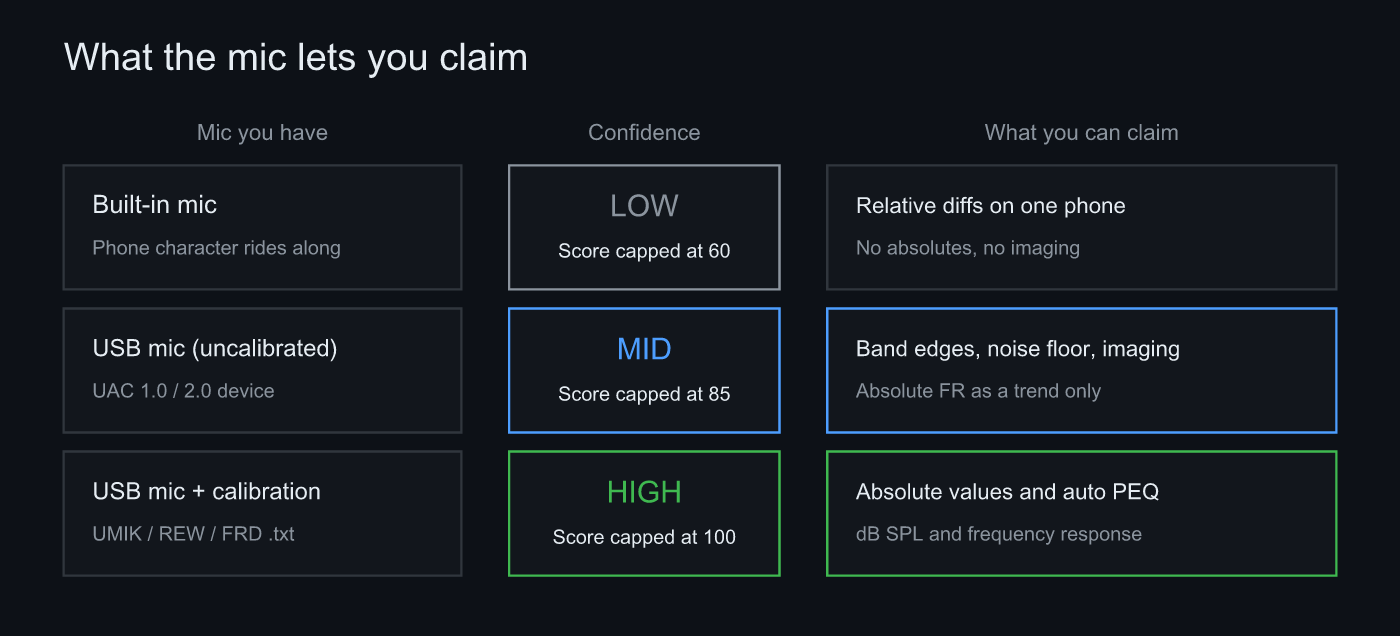 Sonir carries three confidence tiers and caps the overall score at 60 / 85 / 100
Where the difference actually shows
| What you look at | Built-in mic | USB mic (uncalibrated) | USB mic (calibrated) |
|---|---|---|---|
| Relative midrange difference | Readable | Readable | Readable |
| Low-end and top-end limits | Capped by the phone | Extends to the mic’s own limit | Extends to the mic’s own limit |
| Noise floor | High | Low (self-noise remains) | Low (self-noise remains) |
| Imaging | Plateaus on body diffraction | Readable | Readable |
| dB SPL and absolute frequency response | Not available | Trend only | Available |
| Auto PEQ | Not available | Not available | Available |
| Overall score cap | 60 | 85 | 100 |
The top three rows are what changes when you swap the microphone. The bottom three are what only a calibration file unlocks. Swapping to a USB mic does not by itself let you state absolute numbers. Conflating the two, and assuming a better mic means accurate readings, is the most common mistake here.
What cancels, what survives
Record two takes on the same phone and put them side by side, and the mic’s character rides on both equally, so most of it cancels. If you want to see what changed when you swapped the speakers, that is enough.
Two things do not cancel. One is the band the phone mic never captured in the first place, which no difference will bring back. The other is anything that changes between takes. Automatic gain is the headline example.
Automatic gain comes off. The character stays
Automatic gain control lifts a quiet input and holds down a loud one. Phone calls need it. Measurement does not: it destroys the premise that a recording level means something. The floor rises only in the quiet passages, and with it your noise floor and your RT60 stop being trustworthy.
Sonir locks the gain when recording starts and holds it constant for the whole take. On Android it always requests the measurement input that bypasses signal processing, backed by a second pass that explicitly disables gain control right after the recording begins. At first that request was limited to handsets that reported support for it, until we ran into devices that answer “not supported” and then honour the request anyway. So the check went away and the request became unconditional. The fallback path, the one taken when the request fails, turned out to be the thing lifting the quiet-passage floor in the first place. On iOS the audio session opens in measurement mode with processing off.
What survives all of that is the built-in mic’s own frequency character and its noise floor. On the Android handset here, the bare floor with automatic gain off measured about -77 dBFS. A measurement-grade USB mic goes lower, but not to zero: measurement mics have a self-noise floor too, and a low-end rise in a quiet room sometimes turns out to be the microphone rather than the room.
Imaging plateaus on the built-in mic
Sound wraps around the phone body, so left/right correlation and phase metrics hit a ceiling on a built-in mic. That is the reason imaging numbers want an external microphone.
Doing the swap
- Record one baseline take on the built-in mic: fix the position on a tripod, keep the peak between -6 and -12 dBFS.
- Swap in the USB mic without moving anything: exchange the whole mount, keep height, angle and distance.
- Record again with the same source at the same level: break this and everything after it is worthless.
- Overlay the frequency responses: low-end limit, top-end limit, noise floor in the silent passages.
- Load a calibration file if you need absolute numbers: a UMIK, REW or FRD format .txt, bound to the mic profile.
Incidentally, calibration files sometimes ship in two flavours, 0 degrees and 90 degrees. The two diverge above roughly 3 to 5 kHz, by 1 to 2 dB. In the bands where the room and its standing waves dominate they are effectively the same, which is why Sonir recommends the 90 degree file, mic pointing straight up, and stores exactly one curve per mic.
A pile of measurements recorded on a built-in mic, opened six months later, on a phone you no longer own. That is the failure that actually bites, and there is still no good answer for it. The mic profile keeps the device name. It cannot reproduce a character that left with the hardware.
FAQ
How much does a built-in mic differ from a USB mic for air recording?
For relative midrange differences taken on the same phone, barely at all. The difference lives in four places: the band edges (the low-end and top-end limits), the noise floor, whatever automatic gain leaves behind, and imaging. Sonir caps the overall score by measurement confidence: 60 for the built-in mic, 85 for an uncalibrated external mic, 100 for a calibrated one.
Can I keep comparing on the built-in mic?
Yes. As long as the phone, the position, the source and the level stay the same, the mic’s own character rides on both takes equally and most of it cancels. What you cannot do is compare across two different phones, or state an absolute dB SPL or frequency response.
What does a USB mic newly make possible?
The band edges stop hitting the phone’s ceiling, the noise floor drops, and imaging becomes readable. Body diffraction makes the L/R metrics plateau on a built-in mic, so imaging needs an external one. Add a calibration file and absolute values and auto PEQ open up as well.
Is a calibration file mandatory?
Not for relative comparison. It matters for two things: stating dB SPL or a frequency response at absolute accuracy, and generating auto PEQ. Sonir reads UMIK, REW and FRD format .txt files and binds them to a mic profile. The recommended one is the 90 degree file, mic pointing straight up.
Doesn’t automatic gain stay on with the built-in mic?
Sonir turns it off. On Android it always requests the measurement input that bypasses signal processing, with a second pass that explicitly disables gain control right after recording starts for handsets that ignore the first. On iOS the audio session opens in the measurement mode with processing off. Even so, the built-in mic’s own frequency character and noise floor remain.
Related
- How to record and compare air recordings under the same conditions: the parent guide, recording and comparing end to end
- Do you need more than a smartphone for air recording?: what to buy before you buy a microphone
- Can you trust a frequency response without a calibration mic?: how far uncalibrated measurements go
- What recording level should a measurement target?: where -6 to -12 dBFS comes from
Measure it with Sonir
Sonir does air recording, acoustic measurement and comparison on the phone. Start on the built-in mic; when a USB mic arrives, plug it in and select it. Load a calibration file and it is stored against that microphone, and the measurement confidence rises with it. Recording scores, tonal comparison, and overlaying measurements against each other are all free.
Download on the App Store. Android is coming soon. More on the features page.