
I once tried to fill a 40 Hz dip with +10 dB. It didn’t fill. Then I pulled my chair back 10 cm and the same frequency had turned into a peak. Before deciding where to apply EQ, you decide where not to.
The short answer
Room EQ belongs in 20–300 Hz and nowhere else. That band is ruled by the room’s standing waves: move the mic a bit and the peaks and dips stay roughly where they were, which is exactly what makes them fixable. Above 300 Hz the response swings with position, so point corrections don’t belong there. Order matters too: cut the peaks first, and don’t boost the dips. Sonir’s auto PEQ is set up the same way, touching only 20–300 Hz by default.
Why only the low end
Down where the wavelength is the same order as the room’s dimensions, standing waves bouncing between the walls build the sound field. If your walls sit 3.6 m apart, a strong resonance stands at around 47 Hz, the half-wavelength of that distance. This is the modal region, and its ceiling is roughly the Schroeder frequency: around 300 Hz as a rule of thumb, lower in a bigger room.
Because the shape of the room decides where those peaks and dips land, nudging the mic leaves a peak a peak and a dip a dip. They repeat. So a filter that removes one on the analyzer removes it at your ears too.
Past 300 Hz the story changes. Reflections multiply and pile on top of each other, and the response breaks into a fine comb. Worse, the teeth of that comb are set by where you’re sitting. Move the mic 10 cm and peaks and dips routinely swap places. Fit a point filter to a single measurement up there and the moment your ears shift slightly, the peak you cut has become a dip and the dip you filled has become a peak. An EQ you thought was fixing the mids ends up correcting nothing but the position of the microphone.
| Band | What dominates | Does EQ work? |
|---|---|---|
| 20–300 Hz | Room modes (standing waves) | Yes. This is the battleground |
| 300 Hz – a few kHz | Piled-up reflections, position-dependent | Point correction is harmful. Gentle tilt at most |
| Above a few kHz | A comb that shifts with position and aim | Don’t chase it with EQ |
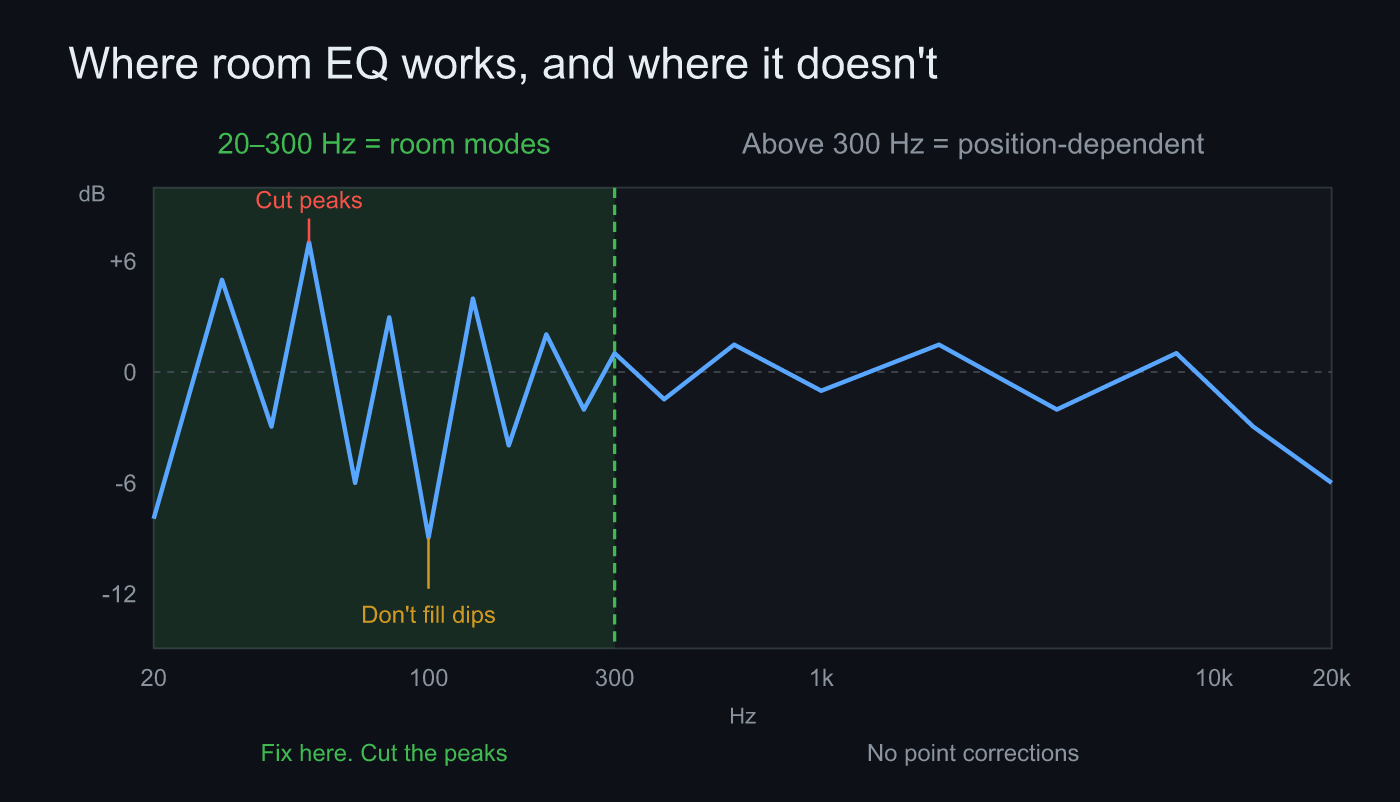 20–300 Hz is the room’s standing waves; cut the peaks there. Above 300 Hz is position-dependent, and what you cut won’t repeat
Cut first, never fill
Here’s the other principle. A low-frequency dip is usually a reflection cancelling the direct sound. Anything cancelled by phase gets cancelled again when you add more of the same frequency. Push +10 dB into it and the dip stays put while the headroom of your amp and speakers disappears. The low end is the most power-hungry band there is, so a pointless boost down there feeds distortion directly.
A peak is the opposite: energy that’s genuinely in surplus, and it goes away when you take it out. That’s what makes cut-first the right default for the low end. The asymmetry in Sonir’s auto PEQ, -12 dB of cut against +6 dB of boost, is that principle written as numbers.
Honestly, early on I couldn’t look at a dip without wanting to fill it. Push the slider up and the curve on screen flattens; listen, and nothing has improved. It took me half a day to work out that what needed moving wasn’t the dip but my chair. When a deep null shows up, moving the speaker or the listening position a few tens of centimetres and measuring again beats any filter.
Steps
- Register the mic’s calibration file: Sonir generates auto PEQ only for a mic with a registered calibration file. Uncalibrated, the mic’s own colouration gets read as the room’s, and the EQ flattens the mic instead of the room.
- Sweep from the listening position: mic where your ears are, recording peak inside -6 to -12 dBFS. A clipped measurement yields no usable frequency response.
- Pick a target curve: Flat / Tilt / Harman / B&K. Harman if you like a room curve with a lifted low end, Flat if you’re after the measurement. The tilt defaults to -0.8 dB/oct.
- Set the EQ ceiling around 300 Hz: 20–300 Hz by default, movable from 80 to 500 Hz. Pull it down in a large room.
- Cut the peaks: auto PEQ works down the residual, largest peak first, up to 10 filters. If a dip runs deep, don’t fill it. Move and measure again.
- Export to REW / Equalizer APO: filter list and preamp as text, loaded into the PEQ on the playback side. Export is free too.
FAQ
Can’t a dip be filled with a boost?
No. Most low-frequency dips come from reflections cancelling the direct sound, so lifting the same frequency with EQ leaves the cancellation intact and only eats headroom. That asymmetry is why Sonir’s auto PEQ caps boost at +6 dB and cut at -12 dB.
Should the mids and highs be left completely alone?
Don’t apply point corrections there. Above 300 Hz the response swings hard with position and orientation, and an EQ fitted at one spot falls apart at another. If you touch it, go no further than the gentle tilt of the target curve (-0.8 dB/oct by default).
Can auto PEQ run without a calibrated mic?
No. Sonir generates auto PEQ only for a mic with a registered calibration file. Uncalibrated, you still get the frequency response plot and the target curve overlaid on it.
Is the EQ ceiling fixed at 300 Hz?
It defaults to 300 Hz and moves on a slider from 80 to 500 Hz. The bigger the room, the lower the top of the modal region (the Schroeder frequency) sits, so a large room wants the ceiling pulled down.
Related articles
- Measuring frequency response and applying room EQ from a phone: the parent guide, from measurement to correction to export
- Can a phone replace REW?: how far the mobile route actually gets
- What dBFS should you record at for measurement?: the level-setting in step 2, in detail
- Measuring room acoustics with a smartphone: a full guide: what sweep → IR can measure
Measure it in Sonir
Sonir is an app that completes acoustic measurement and comparison on your smartphone. Measure the frequency response with a sweep, and watch it generate PEQ for 20–300 Hz from the difference against your target curve, right on screen. Everything is free, including export to REW / APO.
Download on the App Store. Android coming soon. See the features page.