
“How do you actually record an RT60 measurement on a smartphone?” The procedure itself is short. People trip on the same single point almost every time, so here it is folded into 5 steps in the order that keeps that point from biting you.
The short answer
Five steps: pick the measurement position, set the input peak to -6 to -12 dBFS, run a longer sweep to earn SNR, record a full-band sweep into an IR, and check the decay curve is straight before reading RT60. Almost everything that breaks the value lives in step 2: the recording level.
Why this order
Position and level come first because no amount of careful analysis downstream can undo a broken input. RT60 comes from the slope of the decay, and when the input clips the slope flattens and the value inflates. That makes setting the level the real measurement. The nasty bit: trying to earn SNR with volume is exactly what invites that clip. So SNR goes to sweep length instead. Lock the order as “level, then length” and the run-to-run wobble mostly disappears.
The steps
Here’s the actual work, using a Sonir sweep measurement as the example.
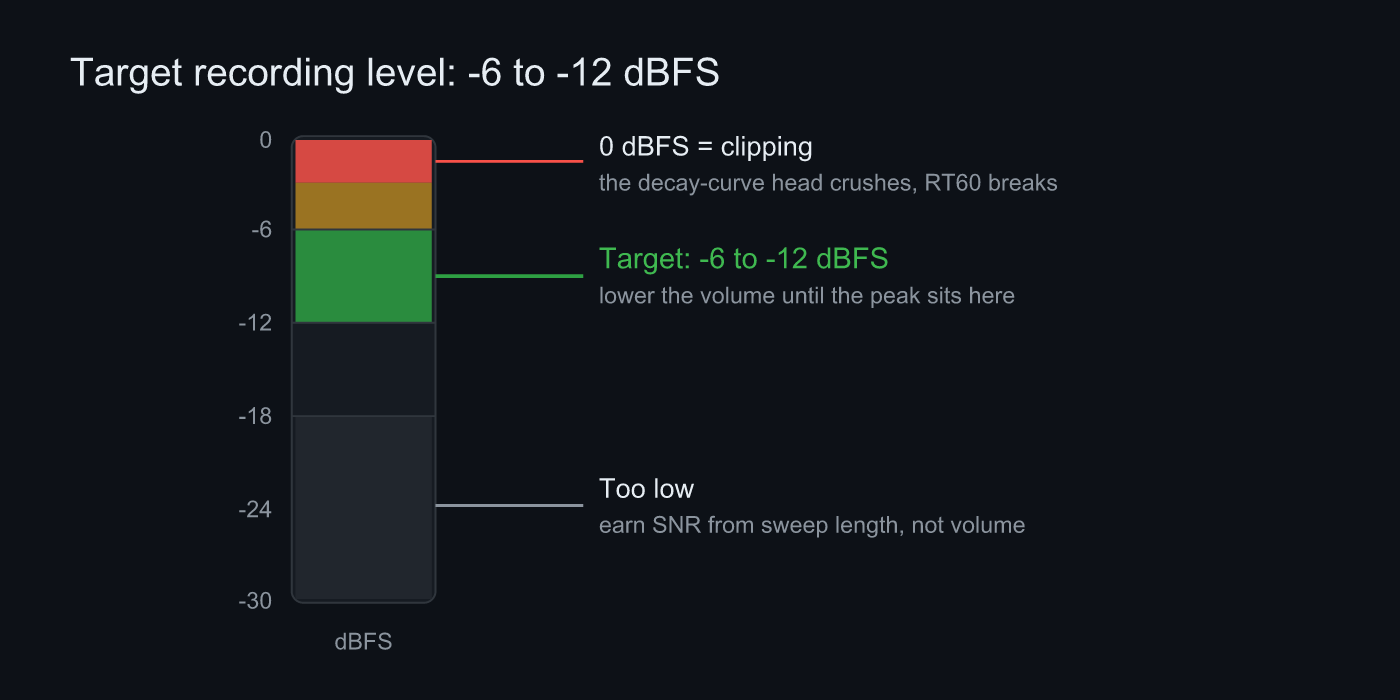 Lower the volume until the input peak sits in the -6 to -12 dBFS band. Hit 0 dBFS and RT60 breaks; if you go too low, make it up with sweep length
- Pick the measurement position: Mount the phone at the listening position on a tripod or stand. Skip handheld. Movement and handling noise land on the head of the IR and break everything downstream. Keep it off walls and desks, and aim the mic at the center of the room to reduce bias from early reflections.
- Set the input peak to -6 to -12 dBFS: While the sweep plays, watch the level meter and lower the volume until the peak sits in that band. Clipping is the single biggest thing that breaks RT60. Sonir shows the peak in its pre-record input check, so settle the volume right there.
- Earn SNR from sweep length: Make up any S/N shortfall with a longer sweep, not more volume. Longer at the right level beats short and loud. Measuring with a long sweep at midday is often more stable than killing the AC for a late-night session.
- Record a full-band sweep into an IR: Play a 20 Hz to 20 kHz sweep and record it simultaneously. Sonir convolves an inverse filter to recover the room’s impulse response (IR).
- Check the decay curve and read RT60: Sonir runs the IR through Schroeder integration and computes RT60 / EDT / C50. A straight decay curve is fine. A crushed, flattened head is the sign of clipping, so drop the level and re-record. Finally split into octave bands and check whether only the lows drag on.
FAQ
What recording level should I aim for when measuring RT60?
Aim for a volume that keeps the recording peak between -6 and -12 dBFS. Clipping breaks RT60, so lock the level in before you measure.
How long should the sweep be?
It depends on the room and the background noise. When in doubt, start long and shorten it as long as you have enough SNR. When the value starts jumping around, that’s the floor.
Can I hold the phone during the measurement?
Fix it on a tripod or stand. Handheld, your movement and handling noise land on the head of the IR and disturb the RT60 slope.
Is one measurement enough?
Measure two or three times at the same position and check the values agree. Big run-to-run scatter is a sign to suspect clipping, position drift, or background noise.
Related articles
- How to measure RT60 with a smartphone: a full guide: the parent guide. RT60’s definition, rules of thumb, and the mechanism that breaks it
- Feature details: sweep → IR through to RT60, waterfall, and frequency response
- Listening room simulator: before you measure, estimate where the low-frequency modes land from the room dimensions
Measure it in Sonir
Sonir is an app that completes acoustic measurement and comparison on your smartphone. The RT60 measurement in this guide too: just play the sweep and record, and it derives RT60, EDT, C50, and waterfall from the IR automatically. Basic measurement is free; per-band deep dives are Pro.
iOS / Android, coming soon. See the features page.