
When RT60 comes back over 2 seconds, the first suspect isn’t the room — it’s the recording level. One clipped measurement can make a perfectly reasonable room look like a bathroom. You don’t need dedicated measurement gear: a smartphone sweep measurement can produce a reasonably trustworthy RT60. The hard part isn’t the measurement itself, it’s not missing the points where the value falls apart.
The short version
A smartphone can measure RT60 at a practical accuracy. There are only two keys: keep the recording peak between -6 and -12 dBFS, and earn your SNR from sweep length rather than volume. Hold those two and most of the “the value jumps around every time I measure” behavior disappears.
What RT60 is
RT60 (reverberation time) is the time it takes for sound to decay by 60 dB after the source stops in a room. That’s the whole definition — but in practice you almost never get to measure the full 60 dB cleanly. You fit a line to the slope before the signal sinks into the noise floor, say the -5 to -35 dB region (T30) or the -5 to -25 dB region (T20), and extrapolate that slope out to a full 60 dB.
In plain terms, the “boom” of a speaker or the “bathroom-y” quality of a recording mostly lives right here. In a room with a long RT60, the trailing edge of sound is sluggish and the bass drags a tail. A room that’s too short is dead, and sound comes across thin. That’s why RT60 is less about “what number was it” and more about “which band is dragging.”
How far a smartphone gets you
Smartphone RT60 measurement isn’t a shrunken version of dedicated gear so much as a different route. The basic flow: play a sweep (a rising chirp) from a speaker, record it, and convolve it with an inverse filter to recover the room’s impulse response (IR). Once you have the IR you can compute the whole set from it — RT60, EDT, C50, frequency response, waterfall. For RT60 you run that IR through Schroeder integration and read the slope of the resulting decay curve.
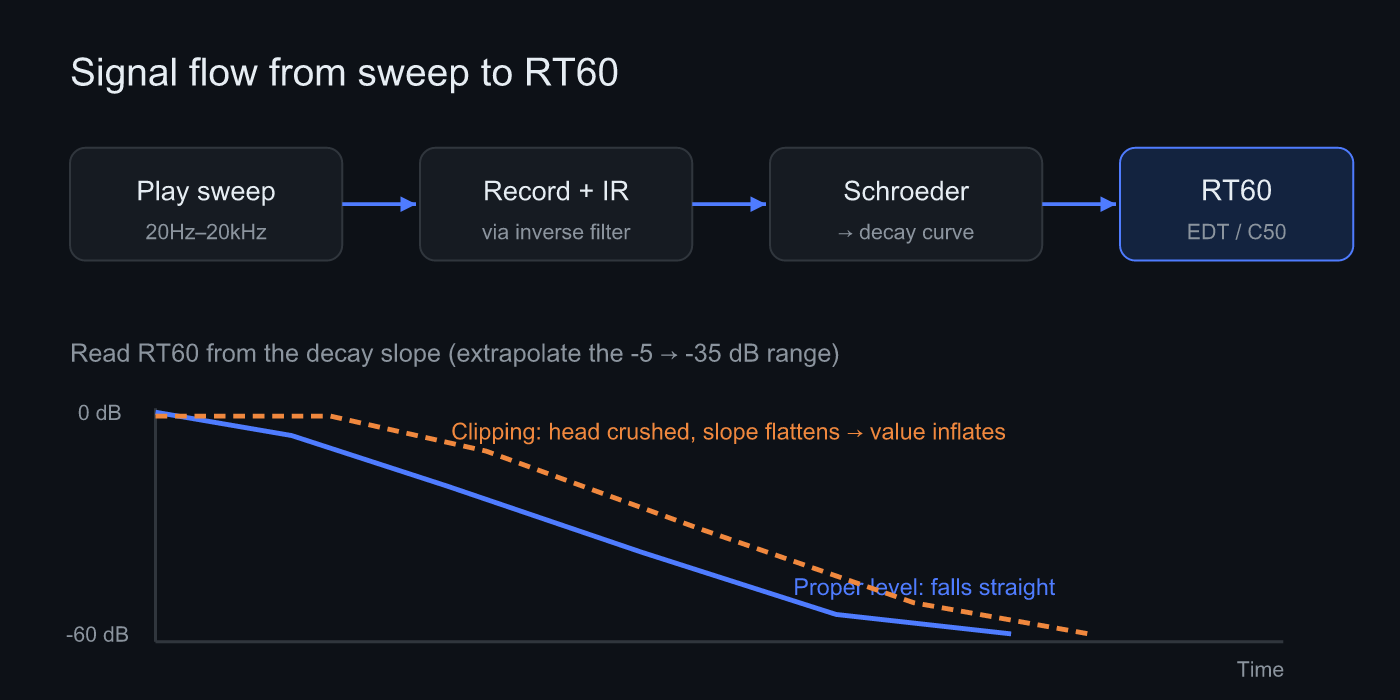 Sweep → IR → Schroeder integration → RT60. When the recording level falls apart, the slope of the decay curve at lower right flattens and the value inflates.
Honestly, a smartphone alone has limits. You can’t get absolute SPL without a calibration mic, because phone mics vary unit to unit, and the built-in mic’s frequency response has its own quirks per model. But RT60 is a time-domain index — it measures how long sound tails off in a room — so the slope still comes through even when the mic’s absolute sensitivity is off. That’s where smartphones and RT60 fit each other well. It’s the same reason Sonir puts RT60 dead center in the MVP: it lets you connect air recording and acoustic measurement on the same device.
Load a calibration file (.txt) and you can correct the mic’s response. If you want to nail down frequency response you’ll need calibration, but for just looking at RT60 the built-in mic is plenty usable as a relative comparison.
RT60 rules of thumb
“Is my room’s RT60 a good value?” is the first thing people want to know. Here’s a rough guide referenced to the midrange (around 500 Hz to 1 kHz). The optimum shifts with room volume, so read it as ranges rather than pinpoint numbers.
| Use case | RT60 target (mid) | Symptom |
|---|---|---|
| Recording / vocal booth | 0.2–0.3s | Too long and the room bleeds into the take |
| Home theater | 0.3–0.4s | Too long and dialogue gets muddy |
| Listening room | 0.3–0.5s | Too long and the bass booms |
| Untreated living room | 0.5–0.8s | Flutter and booming show up easily |
More fruitful than the number itself is looking at the variation across bands. A broadband figure can read 0.4s, but split into octave bands you’ll find 125 Hz alone at 0.9s — that’s common. The average hides the low-end drag. In Sonir you can split RT60 across ISO 3382 octave bands (63 / 125 / 250 / 500 / 1k / 2k / 4k / 8k Hz) (per-band analysis is Pro).
The measurement steps
Here’s how you actually measure. The procedure itself is short.
- Pick the measurement position: Set the phone at the listening position, away from walls and desks. Aiming the mic toward the center of the room reduces bias from early reflections.
- Set the recording level: While playing the sweep, lower the volume until the recording peak sits between -6 and -12 dBFS.
- Play a full-band sweep and record it: Play a 20 Hz to 20 kHz sweep and record simultaneously. Longer at the right level beats short and loud.
- Read RT60 from the IR: Sonir builds an IR from the sweep and computes RT60 / EDT / C50. Check that the decay curve falls in a straight line.
- Look per band: Split into octave bands and check whether only the lows are dragging on.
By the way: the thing that does the most for SNR isn’t quieting the room, it’s lengthening the sweep. A long sweep is robust to noise through correlation processing, and it lifts your S/N without raising the volume. Measuring with a long sweep at midday is often more stable than killing the AC for a late-night session.
The biggest cause of broken RT60 is clipping
This is the heart of it. The vast majority of “my RT60 looks wrong” measurements aren’t a room problem — the recording is clipped.
RT60 is derived from the slope of the decay. When the sweep recording clips, the waveform peaks hit a ceiling, and the energy near the onset of the IR gets recorded smaller than it really is. As a result, the head of the decay curve from Schroeder integration gets crushed and the slope flattens. A flatter slope means a longer time when you extrapolate to a full 60 dB, so RT60 reads longer than reality. In bad cases the regression can’t be fit at all and the value breaks toward NaN.
The nasty part is that this happens through a “well-intentioned” move. “Recording louder should give better S/N,” so you push the volume up. Then the sweep clips in the midrange, where it carries the most energy. The very act of trying to raise S/N breaks RT60. Even the Sonir dev team hit this: early in the sweep runner’s implementation, the recording peak pinned to 0 dBFS and RT60 came out NaN, and we burned time before realizing the room wasn’t the cause.
The fix is simple — keep the recording peak between -6 and -12 dBFS. That’s it. If you want S/N, earn it from sweep length, not volume. Drop the volume to just below clipping and make up the shortfall with a longer sweep. Not reversing that order is the shortest path to a stable RT60.
Summary
- RT60 is the time it takes sound to decay by 60 dB after the source stops in a room. In practice you extrapolate a -5 to -35 dB slope out to 60 dB.
- A smartphone can measure RT60 practically as a relative comparison. Absolute SPL needs a calibration mic, but the RT60 slope comes through even on the built-in mic.
- Keep the recording peak between -6 and -12 dBFS. Clipping is the single biggest thing that breaks RT60.
- Earn SNR from sweep length, not volume.
- Splitting into bands to watch the low-end drag is closer to the room’s reality than a single broadband number.
FAQ
My RT60 doesn’t match how the room feels.
If you only look at a single broadband number, the average hides a room where only the lows are dragging. Look at RT60 per band and you’ll usually find the low end is boomy. Split it by octave and check which band is long.
How long should the sweep be?
It depends on the room and the background noise. When in doubt, start long and shorten it as long as you have enough SNR. When you shorten it and the value starts jumping around, that’s the sign you’ve hit the floor.
How do EDT and C50 differ from RT60?
EDT is a reverberation time derived from the slope of the very early decay (0 to -10 dB), and it’s considered closer to perception. C50 is the energy ratio of the first 50 ms to everything after, an index of clarity. If RT60 is “how long it tails off,” C50 is “how easy the words are to make out.”
Can model-to-model differences in the built-in mic be corrected?
A calibration file can correct the mic’s response, but correcting for model-specific built-in mic differences isn’t fully nailed down yet. For now the safest bet is not to break the “measure on the same device and compare” assumption.
Related articles
- Feature details: Sweep → IR through to RT60, waterfall, and frequency response
- Listening room simulator: Before you measure, estimate where the low-frequency modes land from the room dimensions
Measure it in Sonir
Sonir is an app that completes acoustic measurement and comparison on your smartphone. The RT60 measurement in this guide too — just play the sweep and record, and it derives RT60, EDT, C50, and waterfall from the IR automatically. Basic measurement is free; per-band deep dives are Pro.
iOS / Android, coming soon. See the features page.