
“RT60 came out near 2 seconds. My room can’t possibly ring that long.” That hunch is usually right. What’s broken is the recording, not the room, more often than not.
The short answer
The biggest cause of an RT60 reading too long is the recording clipping, not the room. The head of the decay curve gets crushed and the slope flattens, so you get a value longer than reality, or just broken. Keep the recording peak at -6 to -12 dBFS and most of it goes away.
Why it happens
RT60 is a figure read from the slope of the decay. When the sweep recording clips, the waveform peaks flatten and the energy near the onset gets recorded smaller than it really is. The head of the Schroeder-integrated decay curve then collapses and the slope lays down. A flatter slope, extrapolated from the -5 to -35 dB region out to a full 60 dB, gives a longer time. That’s what “longer than reality” actually is. In bad cases the regression won’t fit at all and the value breaks toward NaN.
The annoying part is that this comes from a well-meant move. “Recording louder should give better SNR,” so you turn it up, and the high-energy mids of the sweep clip. The act of chasing SNR is the act that breaks RT60. The Sonir team hit this early in the sweep runner, with the recording pinned at 0 dBFS and RT60 coming back NaN, and burned half a day before realizing the room wasn’t the problem.
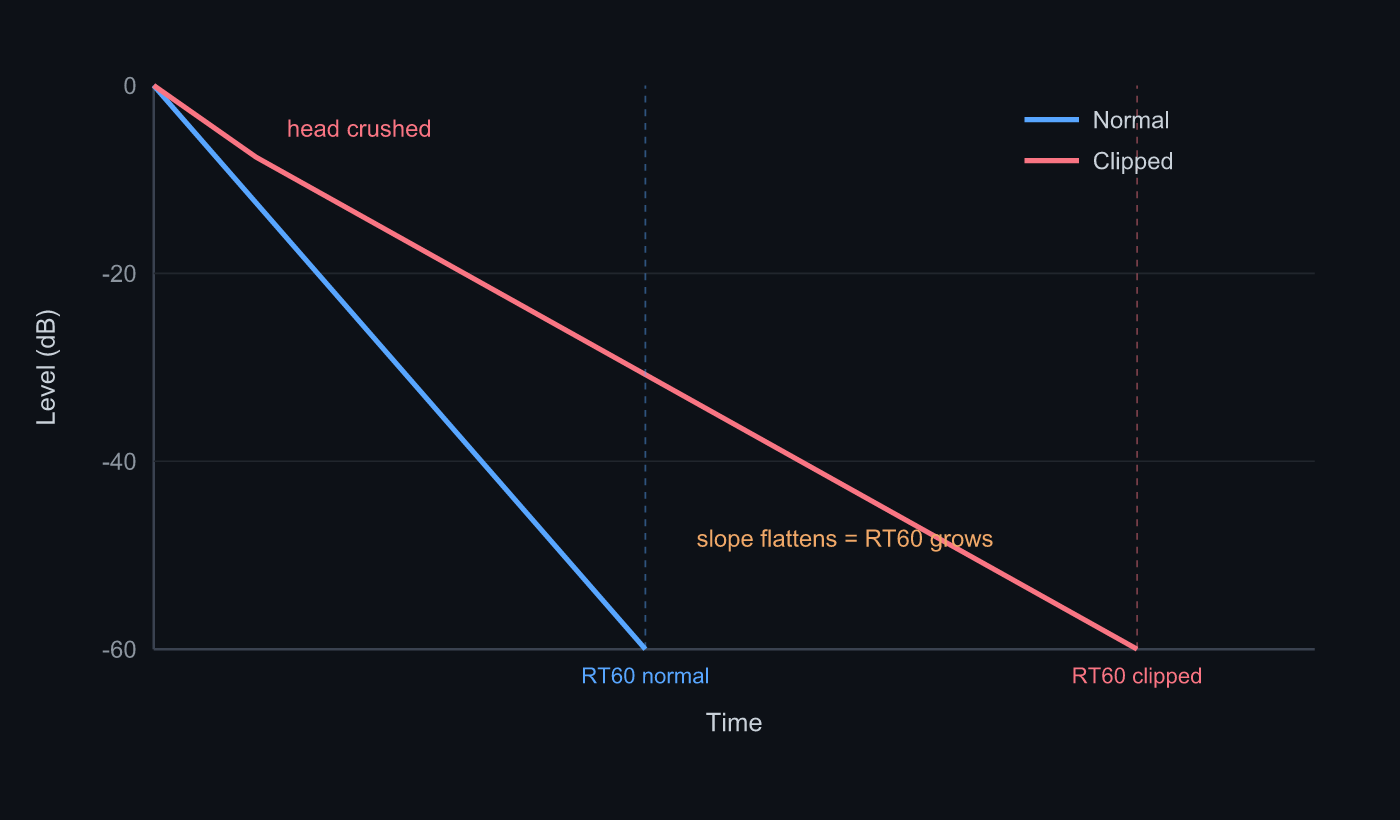 A healthy decay drops cleanly (blue). Clipping crushes the head and lays the slope down (red), so the 60 dB extrapolation runs longer
How to isolate the cause
Knock these down in order and you’ll know fast whether it’s the room.
- Check the recording peak: the level first. If the peak is pinned at 0 dBFS or a clip warning is up, that’s it. Aim for -6 to -12 dBFS.
- Lower the volume and re-record: if it clipped, drop the speaker to just below clipping and measure again. That usually pulls RT60 back to normal.
- Buy SNR with sweep length: if the lower level feels short on SNR, don’t turn the volume back up. Lengthen the sweep. A longer sweep is more robust to noise in the correlation, lifting SNR without more level. Noise bleeding into the decay tail flattens the slope too.
- Disable AGC (Android): on phones that raise gain in quiet passages, the decay tail lifts and reads long. Sonir suppresses AGC, but some devices keep pushing on the built-in mic side.
- Separate room from recording by band: if nothing above fixes it, only then suspect the room. Split into octave bands. Only the lows dragging means room modes; every band uniformly long still leaves room to suspect the recording.
Incidentally, the opposite of clipping flattens the slope too: background noise or AGC lifting the decay tail. But by frequency, clipping is the first thing to land on.
FAQ
Is clock drift the cause of a broken RT60?
It gets blamed a lot, but on phone measurements the main cause of an abnormal RT60 is clipping. Playback-to-record drift exists, but it doesn’t wreck the slope this far. First check that the recording peak sits at -6 to -12 dBFS.
It didn’t clip, but RT60 is still long.
Next, suspect background noise and AGC. When the decay tail hits the noise floor, or AGC lifts it, the slope flattens. Lengthen the sweep to buy SNR and turn off automatic gain.
RT60 changes every time I re-record.
Your recording peak is probably wandering. If it isn’t steady just below clipping, the slope wanders too. Fix it at -6 to -12 dBFS for repeatable readings.
How far down should I lower the volume?
Until the peak sits at -6 to -12 dBFS. If that leaves you short on SNR, make up for it with a longer sweep, not more volume. Don’t reverse that order.
Related articles
- How to measure RT60 with a smartphone: a full guide: the parent guide. RT60’s definition, how it’s computed, and the full picture of what clipping breaks
- How to measure RT60 with a smartphone: the hands-on level and SNR steps so you don’t miss
- How much RT60 is good for a listening room?: once you measure it right, the targets and how to read the bands
- Feature details: sweep → IR through to RT60, per-band, and waterfall
Measure it in Sonir
Sonir is an app that completes acoustic measurement and comparison on your smartphone. The RT60 in this article too: just play the sweep and record, and it derives RT60, EDT, C50, and waterfall from the IR automatically. Level monitoring and a clip warning are built in. Everything is free, including the per-band deep dives.
Download on the App Store. Android coming soon. See the features page.