
A file labelled 96 kHz / 24-bit, and everything above 22 kHz is dead flat. Not one bit was added to the CD it came from. Containers that got promoted to hi-res without the contents following are common enough to be worth checking.
The short version
Fake hi-res gives itself away at the top of the spectrum. If a file claiming 96 kHz stops at 22 kHz, the source was a CD. Three things to read: how far the signal extends (effective bandwidth), whether it fades or falls off a cliff (roll-off), and what sits above the wall (the floor). No microphone is involved, so the room and the speakers play no part in this one.
What fake hi-res actually is
Fake hi-res means a file that claims a high-resolution sample rate or bit depth while its contents are CD-grade or lossy-derived.
Why the container can outgrow the contents comes straight out of sampling theory. The highest frequency a recording can hold is half its sample rate, the Nyquist frequency. For a 44.1 kHz CD that is 22.05 kHz. Convert that master to 96 kHz and the ceiling moves up to 48 kHz, but nothing was ever stored above 22.05 kHz, so the new headroom stays empty. No information is created. The file size is the only thing that grew.
There is a second kind: material repacked from lossy formats like MP3 or AAC. Lossy encoders throw away the least audible top end first, so depending on the bitrate the signal simply stops around 16 kHz or 20 kHz. Convert that to FLAC or WAV and the discarded band does not come back. The extension says lossless while the contents stay truncated, and the cut survives as a vertical wall.
One point of fairness: upsampling itself is not fraud. Oversampling happens routinely on the playback side. The problem is selling the result as a high-resolution master without saying so. The goal of inspection is not to accuse anyone, it is to know what the file in your hand actually is.
Three traces left in the spectrum
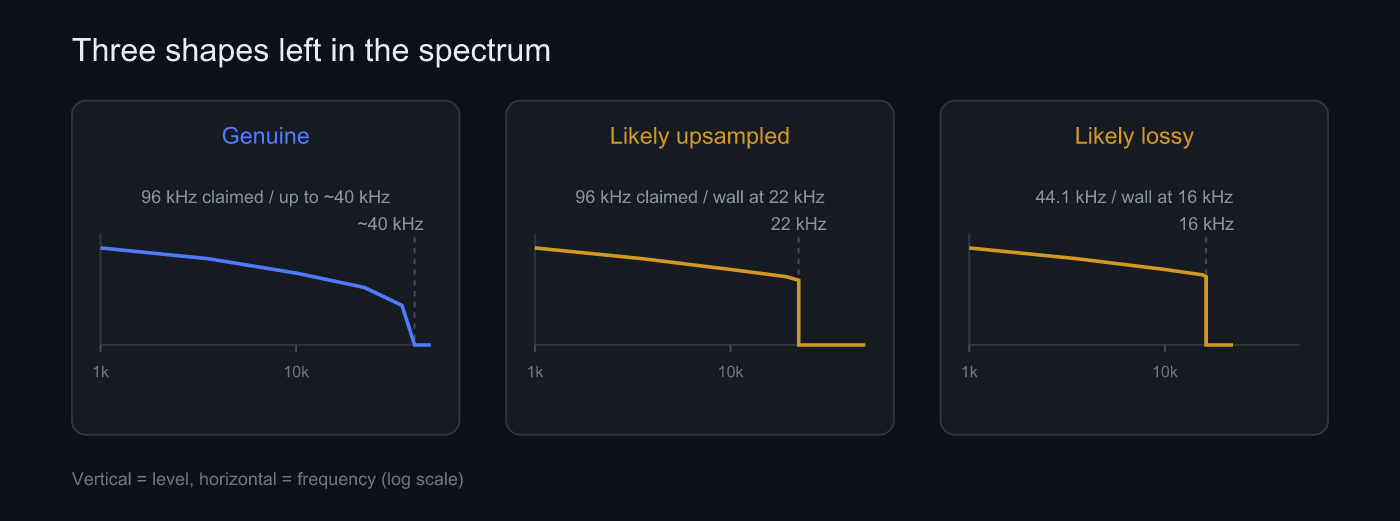 Genuine, upsampled, lossy-derived. The position of the limit and the shape of the fall separate them
Effective bandwidth. How far the signal reaches. The limit is taken as the highest frequency still standing a set amount above the noise floor. Genuine hi-res keeps some content sloping towards Nyquist, however modest. A fake ends abruptly around 22 kHz.
Steepness of the roll-off. Measured in decibels per octave. Natural material, and anything that went through analogue stages, decays gently. Material cut by a digital converter shows the filter’s own response, which comes out close to vertical. That shape is the brickwall, and it is the deciding clue for lossy-derived files.
The floor. If the space above the wall is truly silent, the file was cut and repacked. If a faint noise sits there instead, dither or noise shaping was involved. That case cuts both ways: a raised floor makes the band look wider than the music actually is.
The thresholds
These are the numbers Sonir works with.
| What is read | Threshold | What it means |
|---|---|---|
| Effective bandwidth | Highest frequency above -60 dB from the peak | Taken as the upper limit of the band |
| Hi-res claim | Sample rate above 50 kHz | Treats 88.2 kHz and up as a hi-res claim |
| Upsampling suspected | Hi-res claim + bandwidth under 26 kHz | Contents sit in CD territory; confidence rises with the gap |
| Lossy source suspected | Bandwidth under 86% of Nyquist + roll-off at or above 48 dB/oct | CD-rate file that is too narrow and walled |
| Inconclusive | No energy up high | Silence or very quiet material. Not enough to work with |
The spectrum is taken over 8192 points across roughly the first 90 seconds. That gives about 5.4 Hz per bin at 44.1 kHz and 11.7 Hz at 96 kHz, plenty to place a wall precisely.
Verdicts come out as genuine, likely upsampled, likely lossy, or inconclusive, each with a confidence value. These thresholds are still being calibrated against real material, so for files near a boundary, read the confidence alongside the verdict.
How to inspect a file
- Pick the file: no microphone. Choose an audio file already on the device.
- Note the declared sample rate: 44.1 kHz or 48 kHz is CD territory, 88.2 kHz and up is a hi-res claim.
- Read the effective bandwidth: a hi-res claim that never reaches 26 kHz points to upsampling.
- Look at the steepness: a vertical wall beyond 48 dB/oct is a conversion fingerprint.
- Check the floor and confidence: silence or dither above the wall, and how sure the verdict is.
Because no microphone sits in the path, this part of Sonir behaves unlike the rest of it. No room reflections, no mic colouration, no AGC. The same file gives the same answer on anyone’s device. Environment is the hardest thing to keep still in acoustic measurement, so a measurement that ignores the environment is a relief.
When the verdict is wrong
This part deserves to be spelled out. A hi-res file with a narrow band is not automatically a fake.
Old recordings simply have no top end. Remaster a 1950s mono tape at 24-bit / 96 kHz and nothing appears above 20 kHz. Arrangement matters too: strings and voice carry far less high-frequency energy than programmed drums and cymbals. So does the capture chain. If the microphones and preamps never picked up above 20 kHz, a correctly recorded hi-res file is visually indistinguishable from a fake.
The error runs the other way as well. Dither or noise shaping lifts the high-frequency floor, and a lifted floor reads as a wider band. What the meter sees is noise, not music, yet the limit lands high. The bandwidth threshold alone does not separate those two cases.
That is why the wording is a suspicion. A spectrum shows what lives in the top of one file; it does not show the production history. Rather than ruling on a single track, look at several from the same album. When every track dies at the same frequency in the same shape, that is a process, not the material.
Summary
- Fake hi-res is a high-resolution container holding CD-grade or lossy-derived contents. Raising the sample rate adds no information
- Read three things: effective bandwidth, steepness of the roll-off, and the floor above the wall. A 96 kHz claim stopping at 22 kHz was upsampled
- Lossy sources are given away by a vertical wall near 16 kHz or 20 kHz. Repacking into FLAC does not rebuild it
- A narrow band has innocent explanations too: old recordings, sparse arrangements, the capture chain. Read the verdict as a suspicion with a confidence value
- No microphone is involved, so results do not depend on the room or the mic. The same file always gives the same answer
FAQ
What is fake hi-res audio?
A file that claims a high-resolution sample rate or bit depth while its contents are CD-grade or lossy-derived. Converting a 44.1 kHz master to 96 kHz does not add the information above 22.05 kHz that was never there. Only the container got bigger.
Where in the spectrum can I see it?
At the upper limit and in the way the signal gets there. A file claiming 96 kHz should keep some content up to nearly 40 kHz. If it drops vertically around 22 kHz and there is silence above, the source was a CD. A roll-off steeper than 48 dB/oct is a wall left by conversion.
Can an MP3 converted to FLAC be detected?
Usually, yes. Lossy encoders discard the top of the band, leaving a brickwall around 16 kHz or 20 kHz. Repacking into a lossless container does not restore it, so a CD-rate file with a narrow band and a vertical wall gives it away.
Is every hi-res file with a narrow band a fake?
No. Older recordings and sparse arrangements can genuinely carry almost nothing up high. If the microphones and the chain never captured above 20 kHz, the spectrum looks the same. That is why the verdict is phrased as a suspicion rather than a ruling.
Can I do this on a phone alone?
Yes. File inspection uses no microphone, so neither the room nor the mic accuracy matters. Sonir reads a file from the device and reports effective bandwidth, roll-off, and a verdict. No calibrated microphone, no quiet room.
Related articles
- Measuring room acoustics with a smartphone: the microphone side of measurement, from RT60 to frequency response
- How to measure RT60 with a smartphone: getting reverberation out of a single sweep
- Why does the same speaker sound different every take?: what varies when a microphone and a room are in the path
- Acoustic measurement apps compared: choosing on the measurement side
Inspect it in Sonir
Sonir completes recording, acoustic measurement, and comparison on your phone. File inspection needs no microphone: pick a file from the device and it reports effective bandwidth, roll-off, and a verdict. Stereo correlation and phase, loudness, and effective bit depth sit on the same screen.
Download on the App Store. Android coming soon. See the features page.