
The day after a UMIK-1 arrives, most people spend an evening working out which app will actually read the .txt in the box. That question narrows the field fast. “Calibration supported” is written on a lot of store pages and doesn’t mean the same thing twice, so here’s the field sorted by how far the correction really goes.
The short answer
- If absolute accuracy comes first and you want the calibration side done properly, take SignalScope X. UMIK support is its day job. Subscription.
- If you want a paid-once base you’ll keep for years, AudioTools. Old hand, solid, dated interface.
- If you can sit at a desk, REW is free and complete, and it’s the reference for how calibration should be handled.
- If you want calibration on a phone and then want to compare measurements and recordings, Sonir. Loading the file is in the free tier.
- Display-focused apps like SpectrumView have nowhere to put a calibration file at all.
”Calibration support” is two separate things
Split this first or the table doesn’t read properly. A calibration file does two independent jobs.
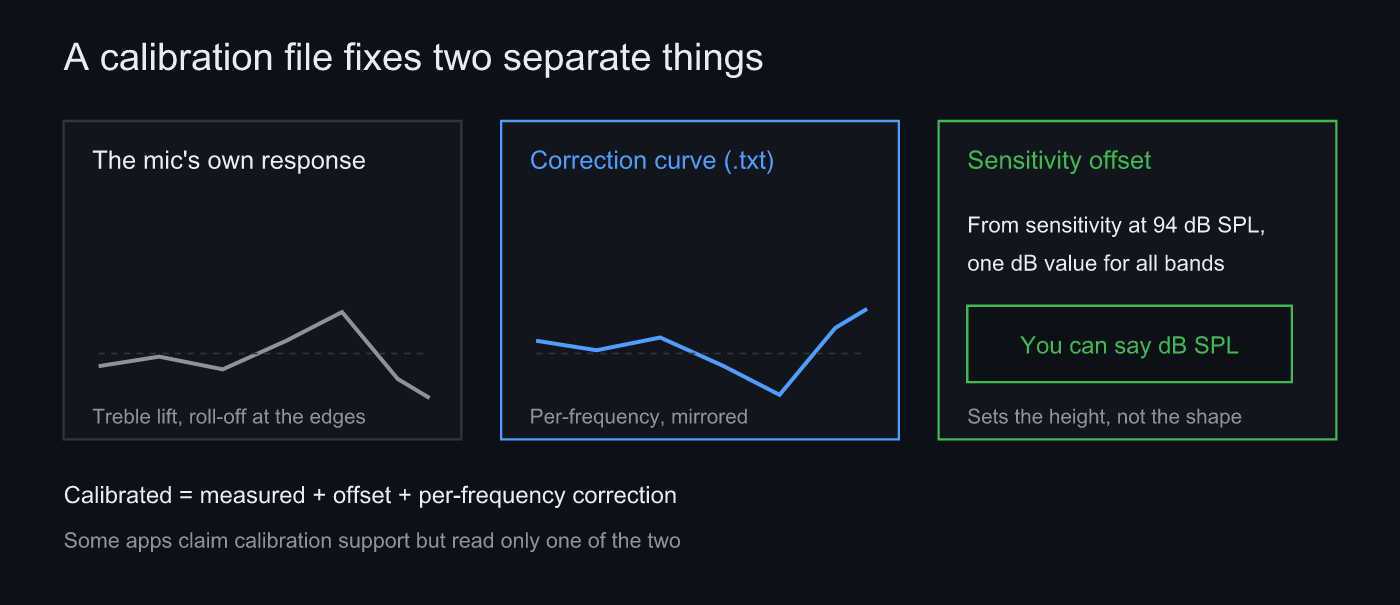 Left and centre: the per-frequency correction curve. Right: the sensitivity offset. Fixing the shape and setting the height are different jobs
The first is the per-frequency correction curve, which cancels that individual mic’s quirks (a lifted treble, roll-off at both ends) frequency by frequency and gets the shape of the response right. The second is the sensitivity offset, a single dB value applied across every band. The Sens Factor at the top of a UMIK file is the mic’s output when fed 94 dB SPL, so the difference derived from it turns the readout from dBFS into dB SPL.
The corrected value is a sum:
calibrated = measured + offset + per-frequency correction(f)Fix only the shape and you still can’t claim an absolute level; set only the offset and the ripples stay. Some apps carry one and not the other, which is why “calibration supported” on its own is a bad filter.
The comparison table
Pricing and support move around. Check the store before you buy.
| App | Per-frequency curve | Sensitivity offset | Measurement reach | Pricing model | Platform |
|---|---|---|---|---|---|
| SignalScope X | Yes (strong UMIK support) | Yes | Up to RT60 (higher tiers) | Subscription | iOS / Mac |
| AudioTools | Yes | Yes | Up to RT60 | Paid-once base + tiered IAP | iOS / Mac |
| SoundTools | Yes | Yes | SPL / spectrum focused | Free + IAP | iOS |
| Decibel X | Not what it’s built for | Partial | SPL / RTA focused | Free + subscription/buy | iOS / Android |
| SpectrumView | No | No | Spectrum focused | Cheap one-time | iOS |
| REW | Yes (UMIK / REW / FRD) | Yes | The full standard set | Free | Windows / Mac / Linux |
| Sonir | Yes (UMIK / REW / FRD / generic) | Yes (also reference source, SPL meter match) | RT60, frequency response, room EQ | Free | iPhone / iPad / Android |
App by app
SignalScope X
On the calibration side it’s a clear step ahead. The whole thing is designed around plugging in a UMIK-class mic, and it’s the pick when absolute accuracy is the point. Higher tiers reach impulse response and reverberation time. The workflow and interface assume you know what you’re doing, and it’s a subscription. If “can I trust this as an instrument” is the first question, this is the answer.
AudioTools
The long-standing iOS measurement app, calibrated long before most. The paid-once base (from $19.99) works in its favour, though adding the modules you need stacks up through tiered IAP. There’s a dedicated RT60 module and seat-to-seat comparison. The interface is old and feels stiff by current standards. Still a serious tool for people who measure for a living.
SoundTools
Free plus IAP, and it handles calibration, which makes it good value on iOS. Its home ground is SPL and spectrum; it doesn’t go deep into pulling RT60 out of a room’s impulse response. If the goal is a calibrated mic giving honest SPL, it fits.
Decibel X / SpectrumView
Neither is a calibration-mic app. Decibel X is an SPL meter with a live display at heart and isn’t built around loading a per-frequency correction curve. SpectrumView is a cheap one-time buy for looking at a spectrum, with no place to put a calibration file. If you’ve just bought a UMIK, there isn’t much reason to shortlist either.
REW
The desktop reference. Free, reads UMIK, REW and FRD files, and produces RT60, frequency response and waterfalls. On calibration specifically there’s nothing it loses on. Its one limitation is that it needs a computer, which bites more than you’d expect when the measurement happens at the listening seat.
Sonir
It reads the calibration .txt on the phone. UMIK (miniDSP), REW and FRD are handled by format, and anything else falls through to a generic numeric scan, so comma, tab or semicolon separators and an extra phase column all get absorbed. From a UMIK file it pulls the Sens Factor and SERNO, converting the sensitivity referenced to 94 dB SPL into an offset. The correction curve is interpolated on a log frequency axis.
Loading the file is free, and so is external USB mic support. From there a sweep gives you the impulse response and RT60, EDT, C50, frequency response and the waterfall come out automatically. Automatic PEQ generation for room EQ only runs on a calibrated mic, deliberately: producing low-end correction values off an uncalibrated curve is close to guesswork.
Holding the ticket is not the same as the ride
Calibration file support isn’t a differentiator, it’s an entry ticket. People who measure seriously don’t even look at apps that lack it. Which means picking on support alone narrows you to about four candidates and then leaves you without a criterion.
What separates them past that point is what you do with the accuracy. SignalScope and AudioTools are complete at “produce a correct number”, and that’s a coherent position. REW does the same on the desktop with everything included. Sonir differs in carrying that accuracy into comparison: overlay the frequency response of speaker A and B measured with the same calibrated mic and read the difference, line up recordings captured under identical conditions, put a recording score on them. The design doesn’t stop at a value; it takes you to which one differs and how.
Honestly, judged on absolute accuracy alone I wouldn’t claim Sonir is top of this list. If you can build a desk around the measurement, REW gives you more room to move, and on iOS the sheer accumulation behind SignalScope as an instrument is hard to match. Sonir earns its place when you want to carry a measurement around and hold it against another one.
An aside: measurement mics like the UMIK and the EM-01 sometimes ship two calibration files, 0 degrees (on axis) and 90 degrees (vertical). They diverge by roughly 1-2 dB above about 3-5 kHz. Where the room, standing waves and RT60 dominate, the two are effectively the same. Sonir’s main use is measuring a room from the listening position, so it recommends 90 degrees and keeps one curve per mic. When comparing left and right speakers the rule is to fix the mic’s position and orientation and change only which speaker plays, so both channels end up on the same curve anyway.
What to pick, by use
- Absolute accuracy first, an instrument on iOS: SignalScope X
- A paid-once base to keep for years, calibrated measurement: AudioTools
- A desk is fine, free and complete: REW
- Just want calibrated SPL done right: SoundTools
- Calibration on a phone, then comparing measurements and recordings: Sonir
Owning a calibration mic pulls your shortlist toward tools that output numbers. Decide up front what you’ll be comparing the number against, and the choice past the entry ticket makes itself.
FAQ
Which phone apps can load a calibration file?
On iOS: SignalScope X, AudioTools and SoundTools. Sonir supports it on iPhone, iPad and Android, reading UMIK (miniDSP), REW and FRD files plus generic numeric tables. Loading the file, like every other feature, is free.
Is plugging a UMIK-1 into a phone enough to measure accurately?
No. Every UMIK ships with a per-unit correction curve and a Sens Factor (its sensitivity referenced to 94 dB SPL). Only after an app reads that file are both the shape of the response and the absolute level right. A UMIK without its file is just a well-built uncalibrated mic.
Is there any point measuring without a calibration mic?
Yes. With the same phone in the same spot, before-and-after differences show up fine uncalibrated. What you can’t trust is the absolute level and the shape of the curve, and those are exactly what dB SPL readings and automatic PEQ generation depend on.
Should I load the 0-degree or the 90-degree calibration file?
For measuring a room from the listening position, use 90 degrees (mic pointing straight up). The two differ by roughly 1-2 dB above about 3-5 kHz, so where the room, standing waves and RT60 live they’re practically identical. Sonir keeps one curve per mic and recommends the 90-degree file.
Related reading
- Can you trust frequency response without a calibration mic? — what holds and what doesn’t when you skip calibration
- Measuring frequency response and applying room EQ from a phone — the measurement and PEQ workflow past calibration
- Best RT60 measurement apps compared — the same field sorted by measurement reach
Measure it with Sonir
Sonir does acoustic measurement and comparison on a phone. Load a calibration file (.txt) from a UMIK or similar, apply the correction, then run a sweep for RT60, frequency response and room EQ. Loading calibration files, using an external USB mic, per-band depth, and overlaying measurements against each other are all free.
Download on the App Store. The Android version is coming soon. More on the features page.